
Instagram has started rolling out a new custom font style for its reel-focused Edits app. Now, users in India can create Reels on the platform with the Dhurandhar: The Revenge-inspired text. This comes as the movie, which stars Ranveer Singh, has crossed the Rs. 1,000 crore collection mark at the box office globally, just a couple of weeks after its release. The new custom font style is currently available in the Edits app for iPhone and Android smartphones. Separately, an app developer claims that the video-sharing platform is testing the ability to download Reels for offline viewing, which could be released as part of a future update.
How to Create Reels in Edits App Using Dhurandhar: The Revenge Font Style
On Friday, the US-based social media platform announced that the Edits app is getting a new Dhurandhar: The Revenge-inspired font style. This will allow users to create Reels with the same font style as the film’s poster, recreating them with their own videos and images.
The company said that the new custom font style captures the “styling of the film”, helping creators make Reels around the new Aditya Dhar-directed film, which was released on March 19 in the country. The new font style is currently live in India on Android and iOS devices.
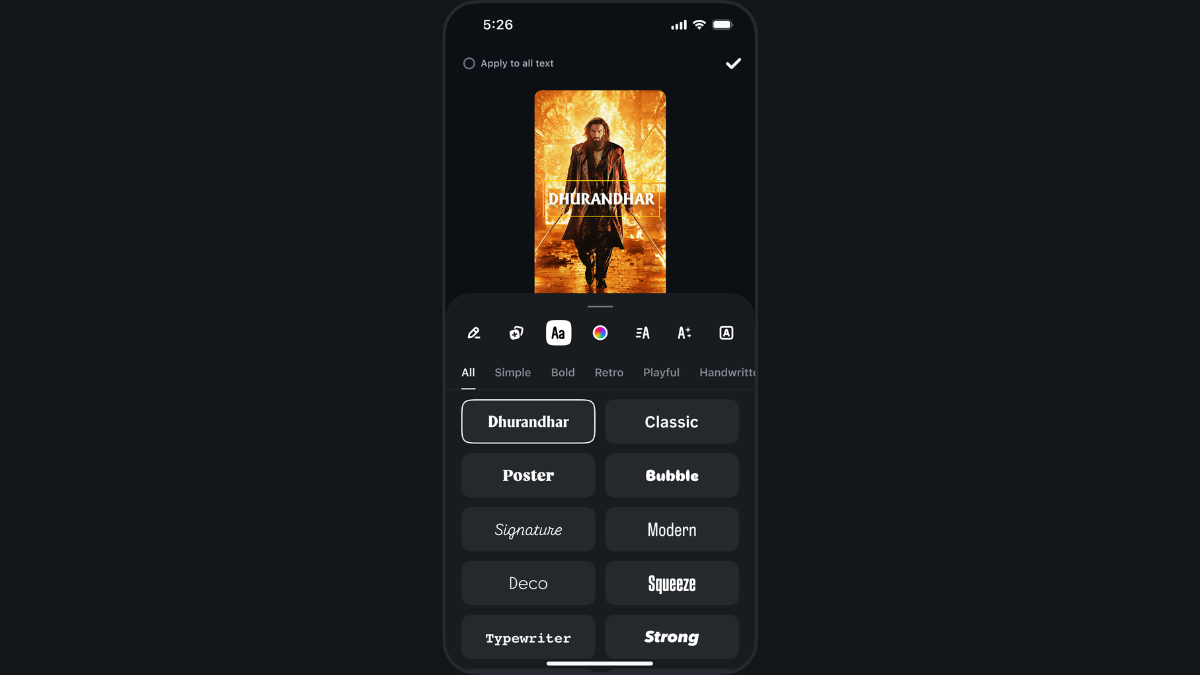
Users can also edit the colour and size of the text.
Photo Credit: Instagram
How to Create Reels With the New Font From Dhurandar: The Revenge
Here’s a step-by-step guide to help you create Reels with a Dhurandhar: The Revenge-inspired font style.
- Download the Edits app, if you haven’t already, from the Google Play Store or Apple’s App Store.
- Then, log in to the app with your Instagram account.
- Tap on the create button in the bottom-right corner of the screen, denoted by a ‘Plus’ symbol.
- You can choose to create the Reel from a video or image in your gallery, or open the camera app to capture one.
- Then, the editor will open as a new project > click on the Text tool in the bottom-left corner > type the text.
- Once done, you can click on the third option from the left in the menu bar, denoted by “Aa”, and then scroll to find the Dhurandhar font style.
- Select the Dhurandhar-inspired font style > Hit Done > Next.
- You can now download the Reel or share it on other social media platforms, including Instagram.
Instagram Could Soon Let Users Download Reels for Offline Viewing
In a post on Threads, Instagram’s microblogging platform, app developer Alessandro Paluzzi has shared two screenshots, claiming that the social media platform is testing the ability to automatically download Reels for offline viewing. While the company has yet to confirm this, the feature is expected to be released as part of a future update. It is shown to appear in the “more” menu on Reels as the “Manage offline downloads” button.
The new feature is expected to allow users to enable automatic downloads for Reels, along with options for downloading Reels automatically only when connected via Wi-Fi, the maximum number of downloads, and a surface mode. Users will reportedly be able to view all their downloaded Reels from the same tab, while also tracking the download status.