
The best Pipedrive alternatives address specific reasons to switch, such as bringing sales and marketing together, enforcing a more structured sales process, or getting hands-on help with migration. Your replacement should solve those challenges while preserving the pipeline visibility and follow-up tools your team relies on.
I compared six Pipedrive competitors, each suited to a different business need. The recommendations below help you narrow your shortlist based on how your team sells, the support it needs, and the complexity it can manage.
HubSpot Smart CRM leads this lineup for connecting sales, marketing, and service teams through shared customer records. Freshsales stands out for built-in calling and lead prioritization, while Nutshell suits businesses that want assistance migrating their data and getting started.
| Pipedrive CRM alternatives | Best for | Starting price/month, billed annually |
|---|---|---|
| Asana | Connecting sales, marketing, and service | Free or $7/user |
| Asana | Built-in calling and lead prioritization | $9/user |
| Asana | Enforcing structured sales processes | Free or $14/user |
| Asana | Assisted migration and onboarding | $13/user |
| Asana | Enterprise governance and sales operations | Free or $25/user |
| Asana | Building visual sales workspaces | $12/user (3-user minimum) |
Overview of the best Pipedrive alternatives
Use the table below to compare companies like Pipedrive on in-browser sales calling, built-in support ticketing, and CRM sandboxes.
| Pipedrive competitors | ||||
|---|---|---|---|---|
| Asana | ||||
| Asana | ||||
| Asana | ||||
| Asana | ||||
| Asana | ||||
| Asana |
Why you can trust Fit Small Business
To ensure we provide readers with the best answers, the Fit Small Business editorial process adheres to strict standards, including rigorous research, assessment, and provider scoring.
I evaluated six Pipedrive alternatives for sales teams, comparing deal management, automation, pricing, and support. I reviewed vendor documentation and plan details to see which features are included at each tier, what data teams can bring over from Pipedrive, and what help they can expect during setup.
Furthermore, I leverage the following work experiences when carrying out software reviews:
- Over 14 years of editorial research and writing
- Over eight years of writing expert reviews about sales and business technologies
- Over two years in insurance sales and team management
- Almost two years in sales territory management

Bianca Caballero
Sales and Marketing Analyst at Fit Small Business
Methodology: How did I evaluate the best Pipedrive competitors?
To find the best Pipedrive alternatives, I evaluated six CRMs using the same rubric. I scored each factor on a 0–5 scale and applied the category weights below to calculate each CRM’s overall rating out of 5.
- Core sales CRM (25%) — I evaluated how each of the Pipedrive competitors links contacts, accounts, and deals. I also reviewed pipeline customization, email and calendar sync, follow-up tasks, mobile access, reporting, and forecasting.
- Pricing and total cost (20%) — I compared standard monthly rates for five paid users on the entry plan and the lowest-priced plan with two-way email sync and custom multistep workflows for records or tasks. I also considered free plans and trials, seat minimums, billing commitments, and how clearly vendors disclose fees and usage limits.
- Automation and practical AI (15%) — I assessed workflow triggers, conditions, and actions, along with lead assignment rules and controls for starting and stopping email sequences. For AI features such as deal summaries and lead prioritization, I checked which plans include them, how much usage they allow, and whether they cost extra.
- Integration and switching (15%) — I reviewed each vendor’s documented options for moving linked records, activity history, and record ownership from Pipedrive. I also evaluated data exports, APIs, webhooks, and integrations with common business tools.
- Administration and security (15%) — I reviewed user permissions, record visibility, audit logs, single sign-on, and multifactor authentication. I also considered how admins can manage multiple teams and test configuration changes before rollout.
- Adoption and support (10%) — I used vendor documentation to assess the work involved in setting up and maintaining each CRM. I reviewed training resources and checked which onboarding and migration services were included and which cost extra.
HubSpot CRM: Best for connecting sales, marketing, and service
Overall score: 4.71/5
Core sales CRM: 4.82/5
Pricing and total cost: 4.23/5
Automation and practical AI: 4.87/5
Integration and switching: 4.83/5
Administration and security: 5.00/5
Adoption and support: 4.50/5
| Pros | Cons |
|---|---|
| Shared customer records across departments | Basic plans do not include sales sequences and forecasting |
| Free lead capture forms and meeting booking | Mandatory onboarding fees for higher tiers |
| Dashboards for sales, marketing, and service | Advanced marketing and service tools can require separate Hub subscriptions |
Why I chose HubSpot CRM
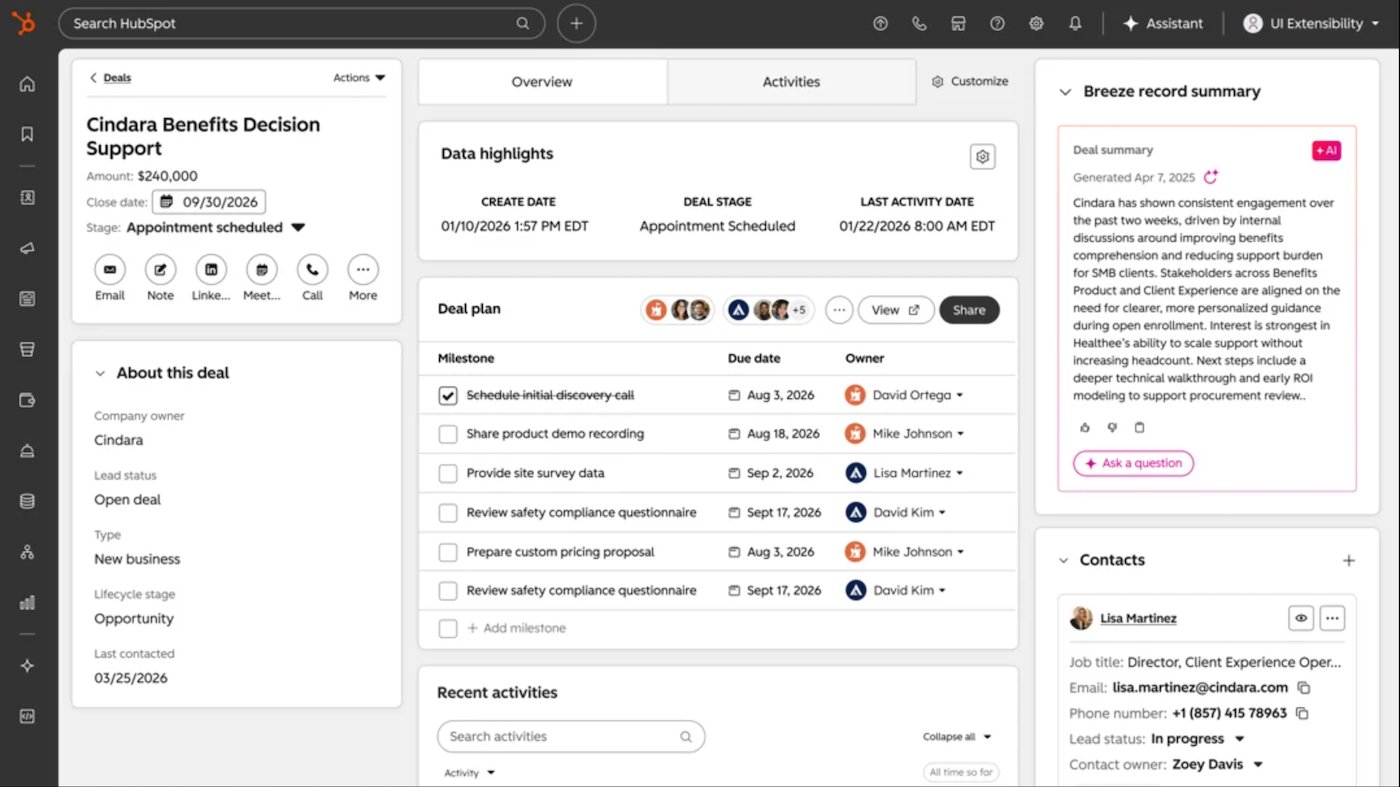
A customer’s history often gets scattered as they move from marketing to sales to support. HubSpot CRM (via Sales Hub) keeps those interactions connected. A rep can see what prompted the first inquiry, and a service agent can refer to the associated deal after it closes. That makes it a practical Pipedrive alternative when several people or departments share responsibility for the same customer.
The cost of that shared setup can climb when several teams need paid tools. Still, if teams regularly reconcile duplicate records or chase down context at handoff, having the history in one place can justify the added expense.
Key features
- CRM-connected forms: Save website inquiries and form responses to contact records for sales follow-up.
- Linked deals and tickets: Give sales and support access to the deal and service records associated with the same customer.
- Cross-team dashboards: Track marketing, sales, and service activity in one platform.
HubSpot CRM pricing
| HubSpot Sales Hub plans | ||||
|---|---|---|---|---|
| Monthly price, billed annually | ||||
| Monthly price, billed monthly |
Read our full comparison of HubSpot vs Pipedrive for even more information on how these two providers stack up against each other.
Freshsales: Best for built-in calling and lead prioritization

Overall score: 4.63/5
Core sales CRM: 4.74/5
Pricing and total cost: 4.83/5
Automation and practical AI: 4.50/5
Integration and switching: 4.50/5
Administration and security: 4.50/5
Adoption and support: 4.50/5
| Pros | Cons |
|---|---|
| Built-in call recording and voicemail drop | Phone credits can add to the subscription cost |
| Territory management for teams across regions | Contact scoring and sales sequences require an upgrade |
| Visual deal pipelines with customizable fields | Advanced forecasting insights and field-level permissions are limited to higher tiers |
Why I chose Freshsales
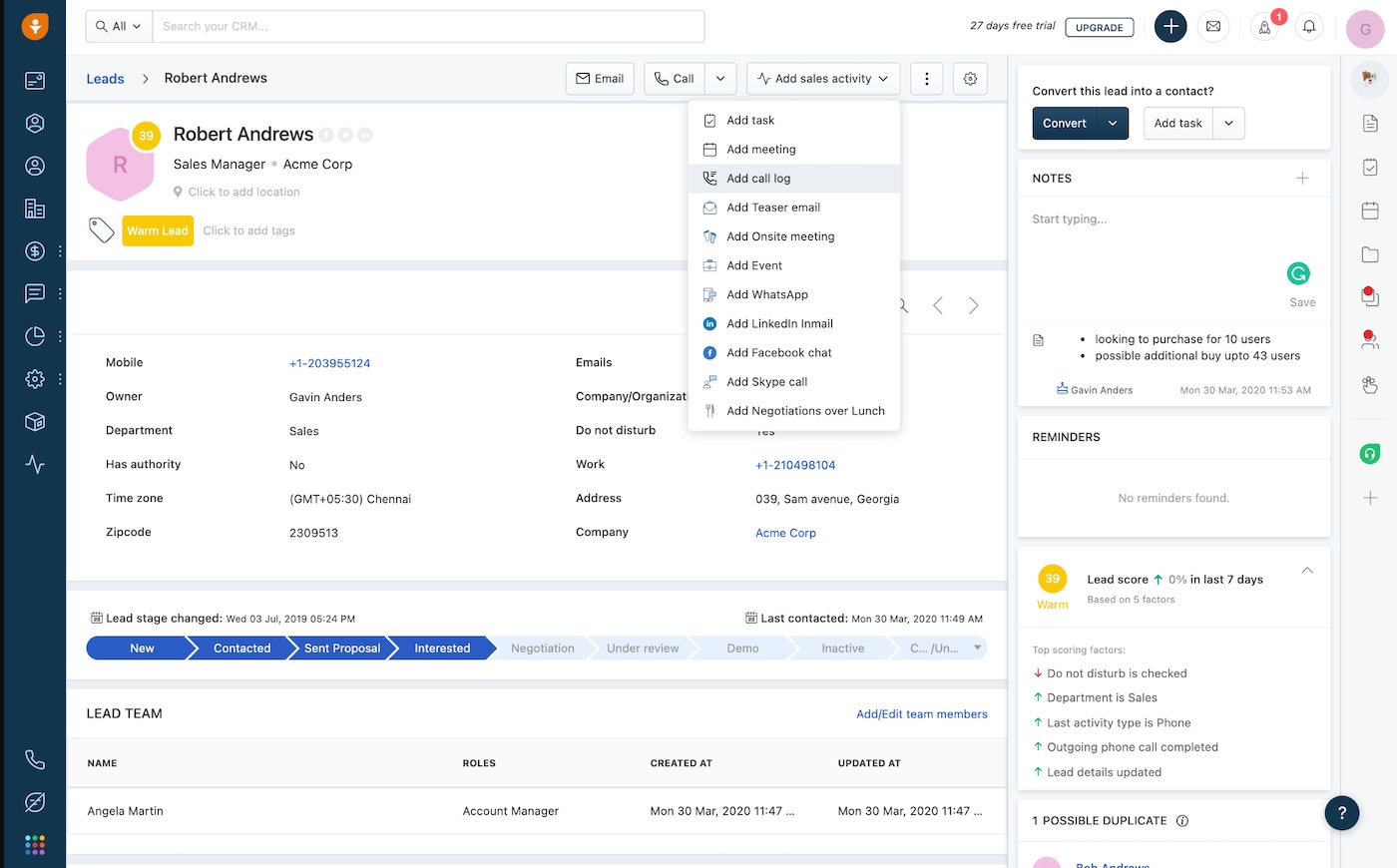
If you’re looking for a CRM similar to Pipedrive, Freshsales pairs visual deal tracking with a built-in phone. Reps can use lead scores to decide whom to call next, place the call, and review deal activity before following up, all from the same workspace. Pipedrive handles browser-based calls through a marketplace integration.
Getting contact scoring alongside built-in calling, however, requires an upgrade. Teams with more prospects than they can reach in a day stand to benefit most because they can use the scores to decide who gets the next call.
Key features
- Built-in phone: Place calls from the CRM and use recording, queues, and voicemail drop to manage outbound outreach.
- Freddy AI contact scoring: Rank contacts so reps can prioritize their call lists.
- Deal insights: Identify open opportunities that need follow-up while reps work through new leads.
Freshsales pricing
| Freshsales plans | Growth | Pro | Enterprise |
|---|---|---|---|
| Monthly price, billed annually | |||
| Monthly price, billed monthly | |||
| Free trial: 21 days | |||
Zoho CRM: Best for enforcing structured sales processes
Overall score: 4.58/5
Core sales CRM: 4.64/5
Pricing and total cost: 4.50/5
Automation and practical AI: 4.43/5
Integration and switching: 4.70/5
Administration and security: 5.00/5
Adoption and support: 4.00/5
| Pros | Cons |
|---|---|
| Guided deal transitions with Blueprint | Active Blueprint limits vary by tier |
| Multiple pipelines and sales forecasting | Approval workflows and sandbox access require an upgrade |
| Built-in quoting and inventory tools | Blueprint takes time to configure and maintain |
Why I chose Zoho CRM
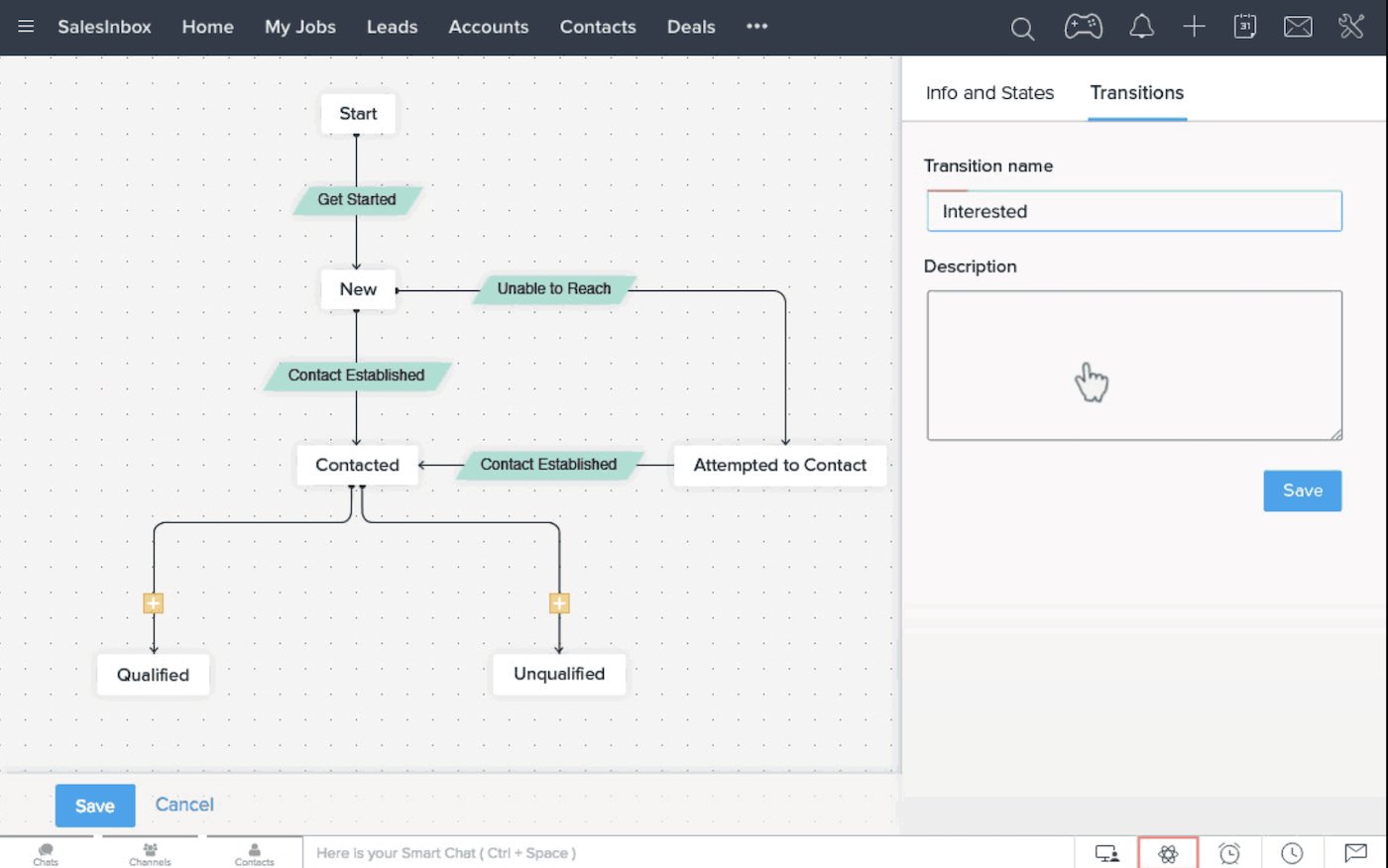
Zoho CRM helps teams follow a consistent sales process through Blueprint, a visual tool for defining what reps must do at each stage. For example, a manager can require reps to complete a discovery checklist before moving a deal to the proposal stage. That gives managers a way to enforce the same steps across one sales team or several.
Setting up those requirements takes time, especially if teams follow different sales processes. The effort can pay off when managers regularly have to chase down missing notes or documents, because reps see what’s required as they work the deal.
Key features
- Blueprint: Require a checklist, attachment, or key information before a rep advances a deal.
- Approval workflows: Route exceptions, such as discounts above a set threshold, to the right approver.
- Configure, price, and quote tools: Apply product and pricing rules as reps prepare quotes.
Zoho CRM pricing
| Zoho CRM plans | |||||
|---|---|---|---|---|---|
| Monthly price, billed annually | |||||
| Monthly price, billed monthly | |||||
| Free trial: 15 days | |||||
Nutshell: Best for assisted migration and onboarding

Overall score: 4.43/5
Core sales CRM: 4.54/5
Pricing and total cost: 4.53/5
Automation and practical AI: 4.37/5
Integration and switching: 4.37/5
Administration and security: 4.13/5
Adoption and support: 4.65/5
| Pros | Cons |
|---|---|
| Staff-assisted data imports during onboarding | Multiple active pipelines require an upgrade |
| Sample Pipedrive migration through Import2 | Ongoing assisted imports are reserved for the top tier |
| Live support and unlimited contact storage | Audit logs are limited to higher tiers |
Why I chose Nutshell
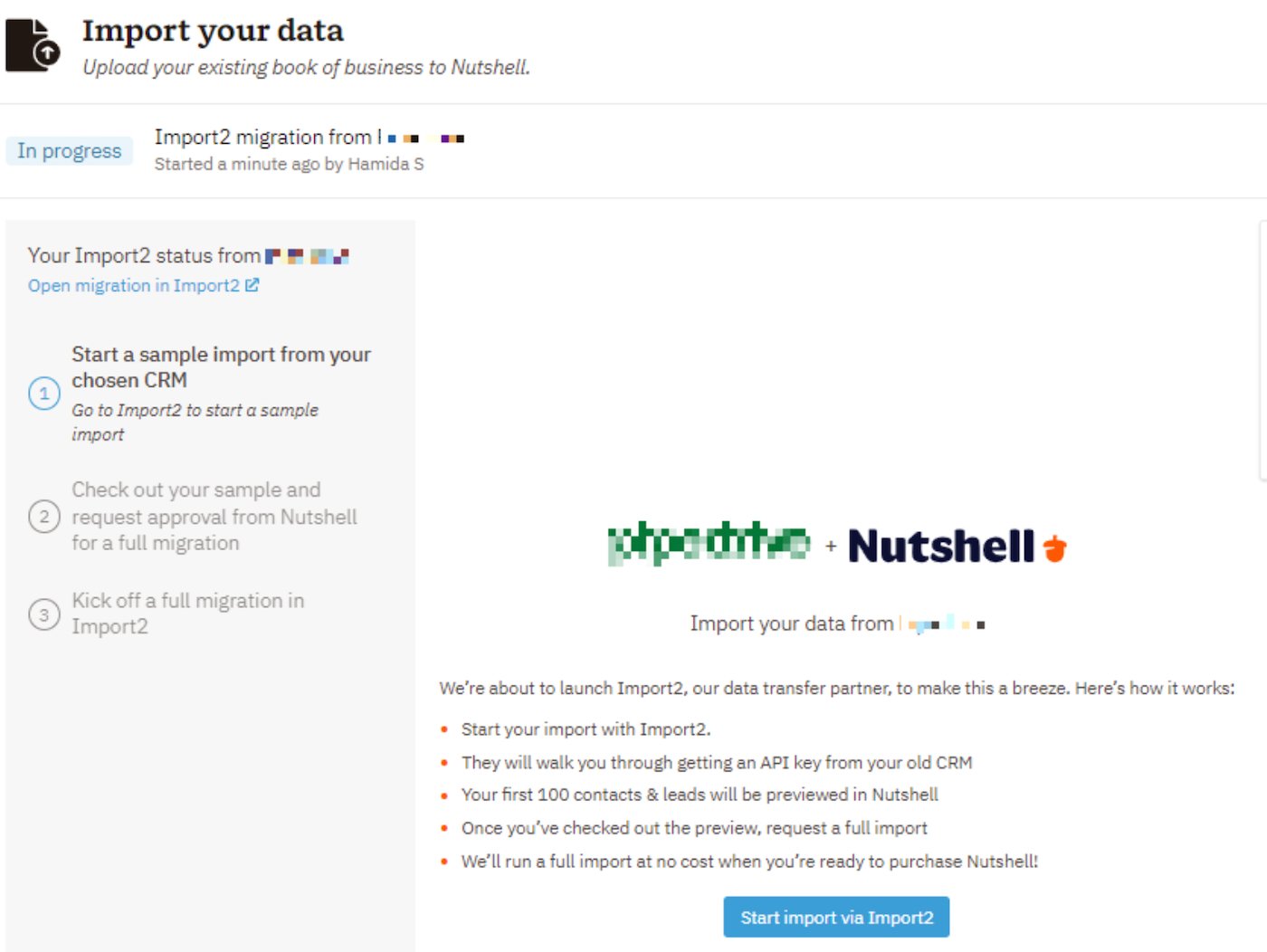
Nutshell earned the highest adoption and support score in my evaluation. Teams can test how a sample of Pipedrive records maps before committing to a full transfer, then request help importing data during onboarding. That gives businesses without a CRM admin a way to get started and gives internal admins more time to validate records and prepare users for the switch.
An upgrade is needed if you want to keep separate pipelines for processes such as new business and renewals. The higher tier, however, preserves how they work, and the included import assistance reduces the work they have to handle during the move. This makes it a great choice for teams that already rely on that separation.
Key features
- Sample migration: Use Import2 to check how a subset of Pipedrive records maps before running the full transfer.
- Staff-assisted import: Get help bringing CRM records into Nutshell during onboarding.
- Connected form setup: Request help linking web forms so new inquiries reach the right CRM after the switch.
Nutshell pricing
| Nutshell plans | |||||
|---|---|---|---|---|---|
| Monthly price, billed annually | |||||
| Monthly price, billed monthly | |||||
| Free trial: 14 days | |||||
Salesforce Sales Cloud: Best for enterprise governance and sales operations

Overall score: 4.41/5
Core sales CRM: 4.76/5
Pricing and total cost: 3.71/5
Automation and practical AI: 4.37/5
Integration and switching: 4.53/5
Administration and security: 5.00/5
Adoption and support: 3.90/5
Why I chose Salesforce
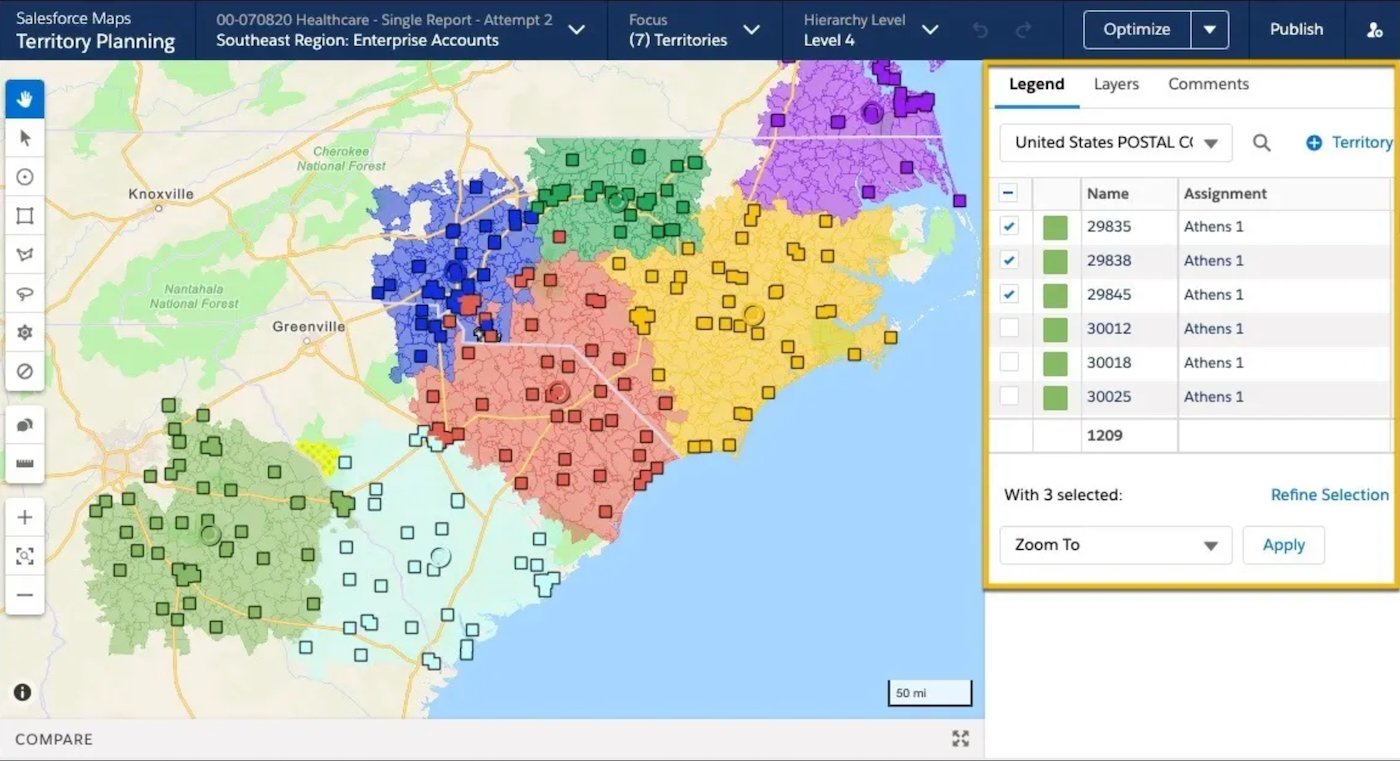
Account ownership gets complicated when regional reps, account managers, and specialists sell into the same accounts. Salesforce (via Sales Cloud) gives sales operations a way to formalize who owns each account and how contributors share deal credit. Those controls can help a growing business establish ownership rules or an enterprise manage them across multiple teams.
One disadvantage is that those rules need someone to maintain them as teams and territories change. Nevertheless, the effort is easier to justify when ownership disputes already slow deals down or a change to permissions could affect several teams at once.
Key features
- Territory models: Test how account assignment rules distribute records before activating a new territory structure.
- Opportunity splits: Allocate deal credit among reps or teams that contribute to the same sale.
- Sandbox environments: Test changes to permissions, automations, and sales processes away from the live CRM.
Salesforce pricing
| Salesforce Sales Cloud plans | ||||
|---|---|---|---|---|
| Monthly price, billed annually | ||||
| Monthly price, billed monthly | ||||
| Free trial: 30 days | ||||
monday CRM: Best for building visual sales workspaces

Overall score: 4.28/5
Core sales CRM: 4.22/5
Pricing and total cost: 4.58/5
Automation and practical AI: 4.37/5
Integration and switching: 3.93/5
Administration and security: 4.17/5
Adoption and support: 4.35/5
| Pros | Cons |
|---|---|
| Customizable boards for sales and onboarding | Requires a minimum of 3 users |
| Automated handoffs between boards | Entry-level boards have limited columns |
| Quote and invoice creation from CRM boards | Automation limits vary by tier |
Why I chose monday CRM
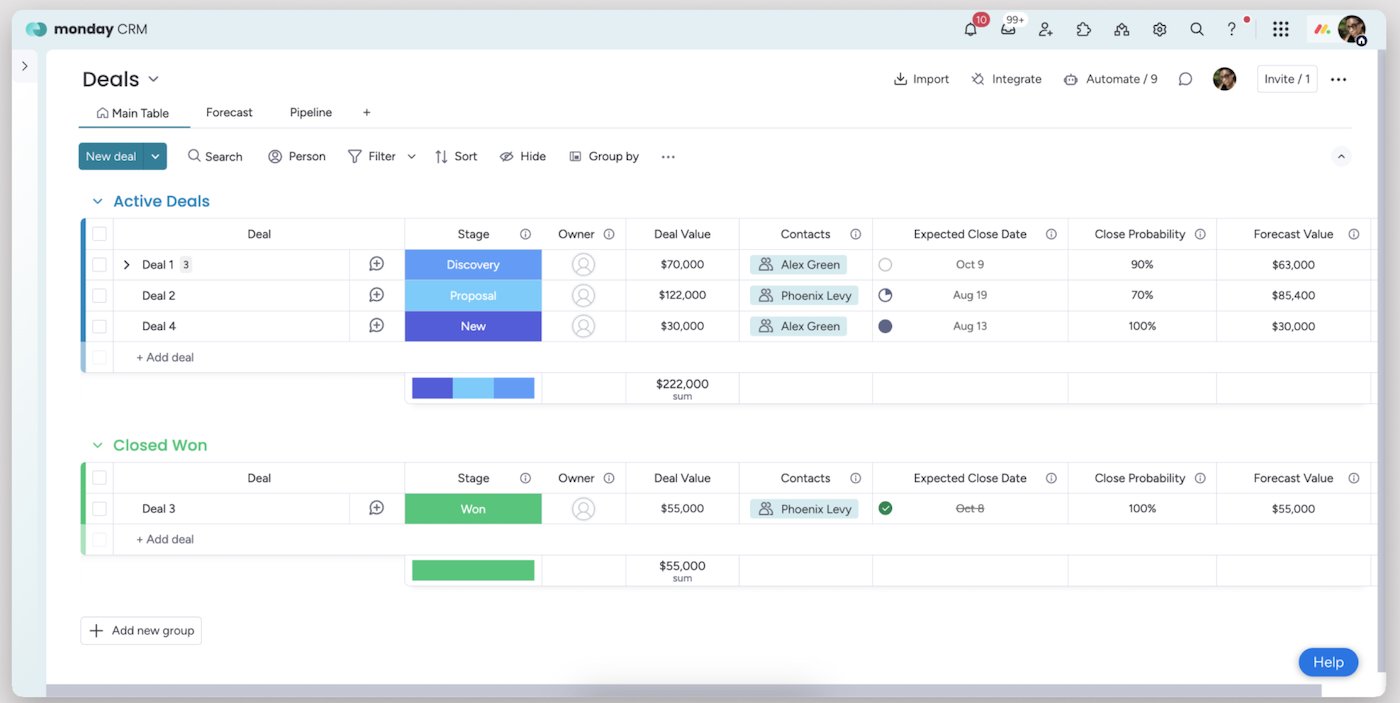
The handoff after a deal closes is where monday CRM stands out. An agency can link a won deal to a kickoff board, and a larger organization can connect separate boards for sales, implementation, and account management. Each team can organize its own work while keeping shared details, such as the agreed start date, visible across boards.
It is worth noting that connected boards take some planning. That said, teams need to agree on what information to share, when to trigger a handoff, and who owns the next step. That setup pays off when deal volume makes it hard to keep everyone informed through messages and spreadsheets.
Key features
- Custom deal boards: Organize sales work around details such as contract status, deal owners, and kickoff dates.
- Connected boards and mirrored fields: Display selected deal details on another team’s board so both teams can work from the same information.
- Cross-board automations: Create and link an onboarding item when a deal is marked won.
monday CRM pricing*
| monday CRM plans | ||||
|---|---|---|---|---|
| Monthly price, billed annually | ||||
| Monthly price, billed monthly | ||||
| *All monday CRM plans have a three-user minimum. | ||||
| Free trial: 14 days | ||||
Best CRM Software
How to choose the right Pipedrive competitors
Start with the problem you want to solve. If leads often go unassigned, ask vendors to show how their CRM routes leads by territory or source. If managers rebuild forecasts in spreadsheets every week, ask vendors to recreate that forecast using deals from multiple pipelines.
Use the same three checks for all the Pipedrive competitors on your shortlist:
- Price the features you need. When comparing cheaper alternatives to Pipedrive, price the lowest tier that includes your must-have features. Calculate the cost for everyone who needs access, including managers, and include any fees for add-ons, onboarding, or migration.
- Run the same deal through each CRM. Have a rep log an email, schedule a follow-up, and move the deal to the next stage. Then have a manager check whether the change appears in the forecast. Note which steps save time and which still require manual work.
- Test a small data import. Bring over a few linked contacts, companies, and deals from Pipedrive. Check that record links, deal owners, custom fields, and activity history carry over so reps can pick up where they left off.
If a Pipedrive upgrade would solve the same problem, use it as your benchmark. Compare subscription costs and weigh any time savings you saw in the trial against the work of migrating data and training your team.
Frequently asked questions
Are there free Pipedrive alternatives?
Yes. Zoho CRM is free for up to three users, while HubSpot CRM and Salesforce Free Suite each support up to two users at no cost. Zoho includes follow-up reminders and standard reports, HubSpot offers meeting scheduling and dashboards, and Salesforce lets you manage sales opportunities and customer cases in one place. To keep Salesforce Free Suite active, log in at least once every 60 days.
How do I export data from Pipedrive to another CRM?
Export your deals, people, and organizations from Pipedrive as CSV or Excel files. Export linked activities, notes, and files separately if you need to keep that history. Before importing everything, test a small batch in the new CRM to make sure contacts stay linked to the right deals and deal owners carry over. Ask the vendor which workflow rules you’ll need to rebuild.
What happens to my sales automations when I switch CRMs?
Ask your new vendor which workflow rules its migration service can move and which you’ll need to rebuild. Prioritize rules that affect active deals, such as lead assignment, overdue-task reminders, and stage-based emails. Use internal email addresses to test follow-up sequences before turning them on for prospects.
Is HubSpot better than Pipedrive?
HubSpot is a better fit if your sales, marketing, and customer service teams need to share customer records. Pipedrive, on the other hand, is a better fit if your sales team mainly needs a visual pipeline for tracking deals and follow-ups. If automation is the reason you’re considering a switch, compare the lowest-priced plan on each platform that supports the workflows you need.