
Microsoft 365 keeps business data in the cloud, but that does not eliminate the need for a separate recovery plan.
Accidental deletion, ransomware, account removal, and configuration errors can still affect data stored across Exchange, OneDrive, SharePoint, and Teams. Microsoft 365 backup products give organizations additional recovery points, retention controls, and restoration options when native protections are not enough.
I compared five leading services based on pricing, workload coverage, recovery capabilities, security controls, administration, and support. Afi.ai earned the highest overall score, while Veeam, AvePoint, Keepit, and Microsoft’s native backup service stood out for different operational needs.
Best Microsoft 365 backup solutions in 2026: Comparison table
The table below compares each Microsoft 365 backup solution by overall score, best use case, starting price, and key features.
| Afi.ai | ||||
| Veeam Data Cloud | ||||
| AvePoint Cloud Backup | ||||
| Keepit | ||||
| Microsoft 365 Backup |
Best Microsoft 365 backup solutions
Here is a closer look at the best Microsoft 365 backup solutions, including their core capabilities, pricing, advantages, and limitations.

Afi.ai: Best overall
Core features: 4.7/5
Pricing: 4.4/5
Advanced features: 5/5
Ease of use: 3.8/5
Customer support: 2.5/5
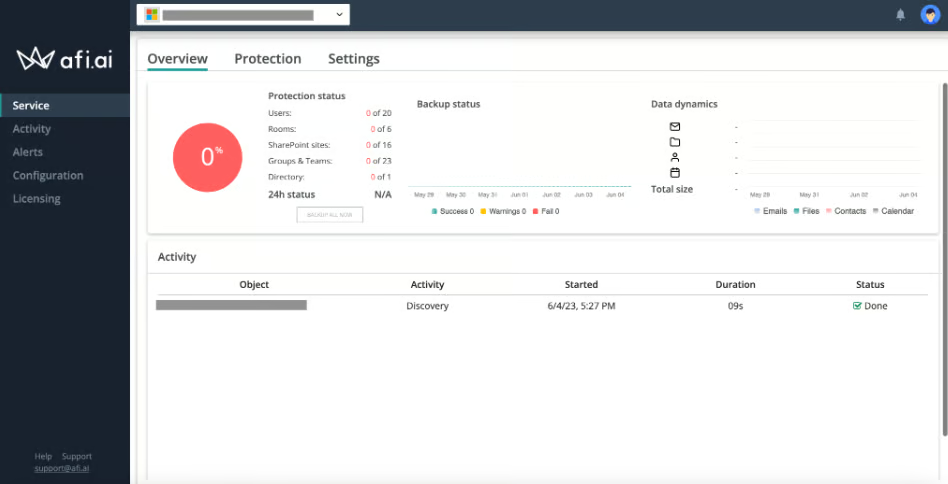
Afi.ai is a cloud-native backup platform for Microsoft 365 and Google Workspace. Its Microsoft 365 coverage includes Exchange, OneDrive, SharePoint, Teams, OneNote, calendars, contacts, and tasks. Key strengths include automated backups, unlimited retention, granular recovery, immutable versions, and ransomware detection.
The platform uses flexible per-protected-user licensing, so organizations can protect only the accounts they need. Archived users can remain in backup storage without requiring an active license. This helps businesses manage offboarding and long-term retention costs.
Why I chose Afi.ai
I chose Afi.ai as the best overall Microsoft 365 backup solution because it delivered the strongest balance of pricing, core recovery functions, and advanced security features. It was also the only provider in my evaluation to receive a full score across both advanced-feature categories.
Afi.ai is best suited to organizations that want unlimited retention, immutable backups, granular recovery, and ransomware protection in one SaaS platform. Its flexible licensing and broad Microsoft 365 coverage also make it a strong option for businesses managing long-term retention and employee offboarding.
Pricing
- SaaS Backup: $36 per user per year, equivalent to $3 per user per month; five-user minimum.
- Data Platform: Custom pricing
Features
- Immutable backup versioning: Existing backup recovery points cannot be changed through the protected Microsoft 365 environment.
- Ransomware detection: Afi.ai offers ransomware detection and preemptive backup capabilities to help administrators respond to suspicious data changes.
- Automated backups: The standard SaaS Backup plan creates backups up to three times per day.
- Unlimited retention: The platform supports an unlimited retention period and number of retained versions.
- Granular recovery: Administrators can search, preview, export, and restore individual items or larger datasets.
Pros and cons
| Immutable backup versions | Five-user minimum |
| Broad Microsoft 365 workload coverage | Volume discounts begin at 500 users |
| Unlimited retention and versions | Infrastructure protection requires the separate Data Platform |
| Free archiving for deleted users | Public support access emphasizes ticket submission |
Veeam Data Cloud: Best for enterprise-grade recovery

Core features: 4.7/5
Pricing: 3.8/5
Advanced features: 3.8/5
Ease of use: 3.8/5
Customer support: 4.4/5
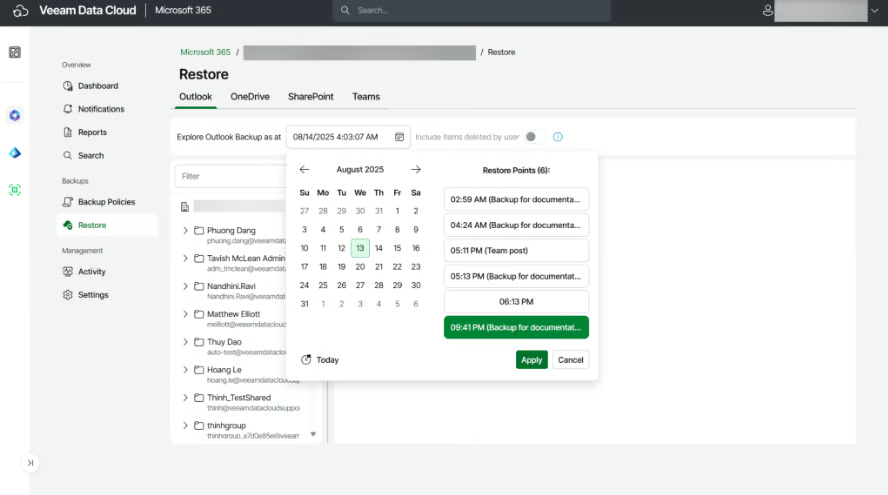
Veeam Data Cloud for Microsoft 365 is a managed SaaS backup product that bundles backup software, infrastructure, storage, and production support. This model removes the need for an organization to deploy and maintain its own backup servers or storage repositories.
Veeam offers Foundation, Advanced, and Premium plans. Foundation focuses on Microsoft 365 backup and recovery. Advanced adds Microsoft Entra ID protection, while Premium adds more extensive disaster recovery capabilities. Entra ID protection is also available separately.
Why I chose Veeam Data Cloud
I chose Veeam Data Cloud for enterprise-grade recovery because it combines broad Microsoft 365 coverage with granular and large-scale restoration in a centrally managed platform. Unlimited backup storage, mature administration tools, detailed documentation, and 24/7 production support make it especially well suited to larger organizations with formal business continuity and recovery requirements.
Veeam is a strong choice for IT teams that want a proven platform without managing separate backup infrastructure. Its annual per-user pricing is straightforward, although Advanced and Premium capabilities require higher-priced plans.
Pricing
- Microsoft 365 Foundation: $42 per user, billed annually
- Microsoft 365 Advanced: $50.40 per user, billed annually
- Microsoft 365 Premium: $84 per user, billed annually
Features
- Unlimited backup storage: Veeam includes backup software, managed infrastructure, and unlimited storage with its Microsoft 365 licenses.
- Granular recovery: Administrators can recover individual Microsoft 365 items in addition to conducting broader restore operations.
- Centralized administration: The service provides one platform for managing policies, backup activity, and recovery operations.
- Entra ID protection: Advanced and Premium extend protection to Microsoft Entra ID data and configurations.
- Included support: All Veeam Data Cloud purchases include 24/7 production support.
Pros and cons
| Unlimited backup storage | The lowest rate requires 251 or more users |
| Veeam-managed infrastructure | Published prices require annual billing |
| 24/7 production support | Advanced capabilities require higher-priced plans |
| Optional Entra ID protection | Rates may vary by region or purchasing channel |
AvePoint Cloud Backup: Best for broad Microsoft cloud coverage

Core features: 4.7/5
Pricing: 1.9/5
Advanced features: 3.8/5
Ease of use: 3.8/5
Customer support: 4.4/5
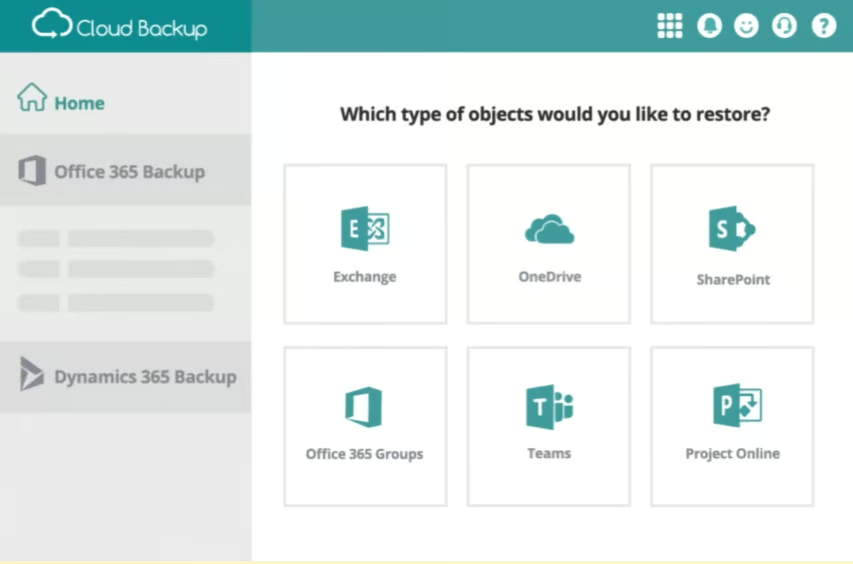
AvePoint Cloud Backup protects a wider selection of Microsoft services than many dedicated Microsoft 365 backup products. Its coverage extends across Microsoft 365, Entra ID, Power Platform, Dynamics 365, Dataverse, and Azure. AvePoint also supports other SaaS products, including Google Workspace and Salesforce.
The service provides granular restoration, long-term retention, cross-tenant recovery, exports, encryption, immutability, and logical air-gapping. Customers can use AvePoint storage or select compatible cloud and FTP/SFTP destinations.
Why I chose AvePoint Cloud Backup
I chose AvePoint Cloud Backup for broad Microsoft cloud coverage because it protects more than standard Microsoft 365 workloads. Its support for Entra ID, Dynamics 365, Power Platform, Dataverse, and Azure makes it well suited to organizations with a larger Microsoft ecosystem. Granular recovery, cross-tenant restoration, flexible storage options, and multiple live support channels further strengthen its value for complex environments.
I recommend AvePoint for companies that want one platform to protect Microsoft 365 and related cloud services. Its custom pricing model allows quotes to reflect specific users, workloads, storage, retention, and support needs. Buyers should review these details carefully when comparing AvePoint with providers that publish standard per-user rates.
Pricing
- AvePoint offers custom pricing for Cloud Backup. Request a quote or use its pricing calculator to estimate costs.
Features
- Broad Microsoft cloud coverage: AvePoint protects Microsoft 365, Entra ID, Dynamics 365, Power Platform, Dataverse, Azure, and other services.
- Unlimited storage and retention: AvePoint advertises unlimited backup storage and retention for its cloud protection platform.
- Cross-tenant recovery: Administrators can export retained data or restore it across tenants.
- Ransomware protection: The platform combines ransomware detection with encryption, immutability, and logical air-gapping.
- Flexible storage: Organizations can use AvePoint-hosted storage or compatible customer-selected destinations.
Pros and cons
| Broad Microsoft and SaaS workload coverage | No standard public starting price |
| Unlimited storage and retention | Buyers must request a demo or estimate |
| Cross-tenant restoration and data export | Express Recovery is presented as an additional protection layer |
| Phone, chat, and support portal | Its broad scope may exceed basic Microsoft 365 backup requirements |
Keepit: Best for independent-cloud protection

Core features: 4.1/5
Pricing: 2.5/5
Advanced features: 3.1/5
Ease of use: 3.8/5
Customer support: 4.4/5
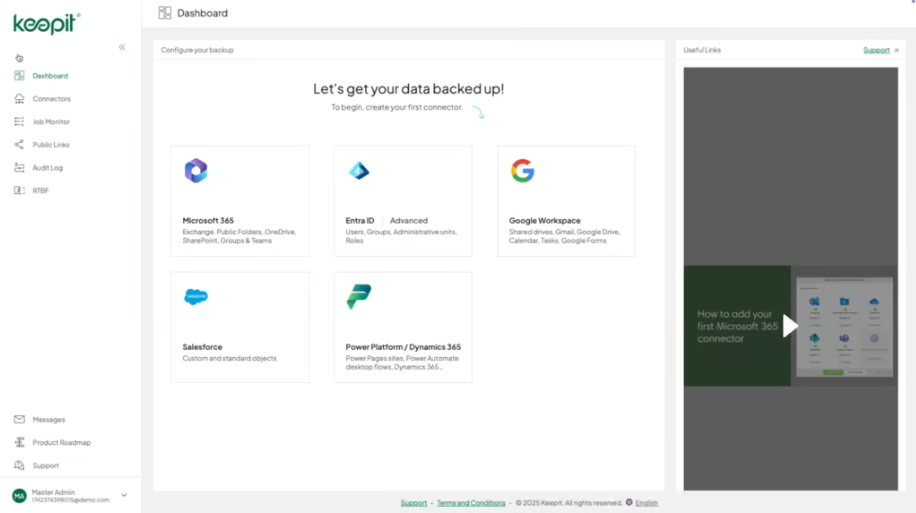
Keepit is a cloud-to-cloud SaaS backup provider with an infrastructure that operates independently of Microsoft’s production cloud. Its platform uses immutable, air-gapped architecture and always-hot storage, which keeps retained backups available without an archive-retrieval process.
Alongside Microsoft 365, Keepit protects Entra ID, Power Platform, Dynamics 365, Azure DevOps, Salesforce, Google Workspace, Okta, GitHub, Zendesk, and several other SaaS services. Microsoft 365 packages include Business Essentials, Enterprise Unlimited, and Governance Plus.
Why I chose Keepit
I chose Keepit for independent-cloud protection because it stores backup data outside Microsoft’s production environment. This separation can reduce vendor concentration risk and support recovery when the primary Microsoft environment is unavailable or compromised. Its immutable, air-gapped architecture also strengthens protection against ransomware and unauthorized changes.
I recommend Keepit for organizations that prioritize data sovereignty, long-term retention, and rapid access to backups. Its always-hot storage keeps data available without an archive-retrieval process, while granular, in-place, cross-user, and full-dataset restoration provide flexible recovery options. Buyers should note that pricing and support vary by package, with 24/7 phone and email assistance reserved for higher tiers.
Pricing
- Keepit offers three Microsoft 365 plans: Business Essentials, Enterprise Unlimited, and Governance Plus. Contact sales for a custom quote.
Package differences can include retention, governance, support coverage, advanced resources, business reviews, and customer-success services. Buyers should also confirm which Microsoft 365 connectors and recovery capabilities are included.
Features
- Independent backup cloud: Keepit stores protected data in a purpose-built cloud that is operationally separate from Microsoft’s production environment.
- Immutable architecture: The platform combines immutable storage with an air-gapped architecture.
- Always-hot storage: Retained backups remain accessible without archive retrieval or separate storage-tier charges.
- Flexible retention: Organizations can configure different retention policies, including periods of up to 99 years.
- Multiple restore paths: Keepit supports in-place, alternate-user, granular, and full-dataset recovery.
Pros and cons
| Independent backup cloud | No standard numerical starting price |
| Immutable, air-gapped architecture | Retention and support vary by package |
| Always-hot backup storage | Business Essentials support is limited to email during business hours |
| Granular and full-dataset restoration | 24/7 phone support requires a higher package |
Microsoft 365 Backup: Best for native Microsoft integration

Core features: 3.8/5
Pricing: 3.1/5
Advanced features: 2.5/5
Ease of use: 3.8/5
Customer support: 4.4/5
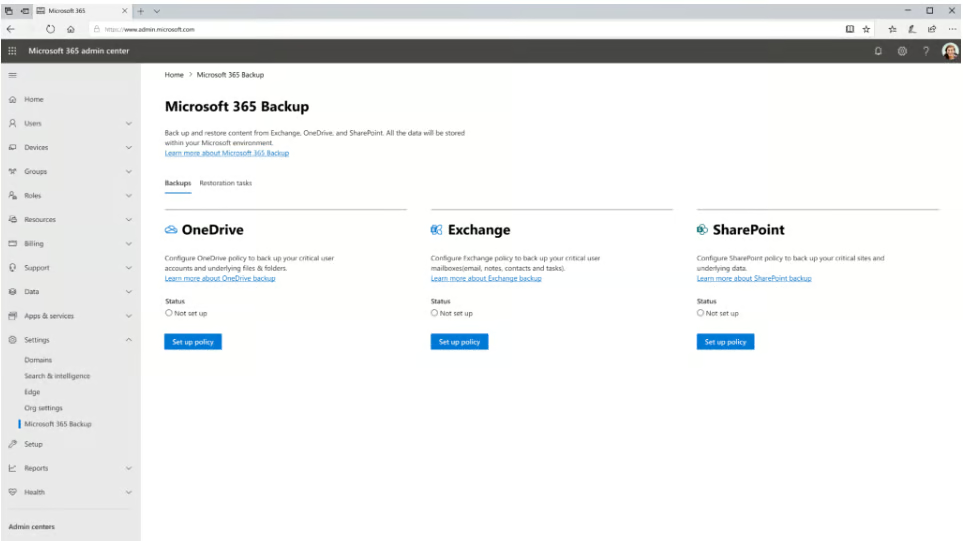
Microsoft 365 Backup is Microsoft’s consumption-based backup service for Exchange Online, OneDrive, and SharePoint. Administrators configure protection and recovery through Microsoft’s management environment, which reduces the need to deploy a separate third-party console.
Microsoft creates frequent recovery points and keeps backup data within the Microsoft 365 data trust boundary. Its architecture uses append-only storage designed to prevent older backup content from being overwritten by client processes or an attacker operating through a compromised account.
Why I chose Microsoft 365 Backup
I chose Microsoft 365 Backup for native Microsoft integration because it is built directly into the Microsoft 365 administration environment. Its pay-as-you-go pricing, ten-minute recovery points, and strong large-scale restoration capabilities make it a practical option for organizations that want to manage backup and recovery without introducing a separate platform.
I see Microsoft 365 Backup as a strong fit for companies that primarily need protection for Exchange Online, OneDrive, and SharePoint. Its native setup can simplify administration and support fast recovery across large environments. However, organizations that need broader coverage for Teams, Entra ID, Power Platform, or other SaaS applications may require a third-party solution.
Pricing
- Microsoft 365 Backup uses pay-as-you-go pricing at $0.15 per GB per month of protected content, with no separate fees for restore operations.
Features
- Ten-minute recovery points: Microsoft provides ten-minute standard recovery points for supported Exchange, SharePoint, and OneDrive data.
- Large-scale restoration: The platform is designed to restore large numbers of OneDrive accounts, SharePoint sites, and Exchange mailboxes.
- Append-only storage: Protected content cannot be overwritten through ordinary Microsoft 365 client processes.
- Native data residency: Backup data remains within the Microsoft 365 trust boundary and follows the tenant’s geographic residency requirements.
- Granular Exchange recovery: Administrators can search for and restore modified or deleted Exchange mailbox items.
Pros and cons
| Native Microsoft 365 administration | Limited to Exchange, OneDrive, and SharePoint |
| Ten-minute recovery points | One-year retention |
| High-speed, large-scale restoration | Deleted and versioned data can contribute to charges |
| Transparent consumption pricing | Some granular OneDrive and SharePoint file recovery remains listed as coming soon |
Key features of Microsoft 365 backup software
The best Microsoft 365 backup software should protect the workloads your organization uses, create recovery points frequently enough to meet your recovery objectives, and make restoration manageable during an incident. Pricing and retention also need to remain sustainable as user and storage volumes grow.
Microsoft 365 workload coverage
Exchange, OneDrive, and SharePoint are the most commonly supported Microsoft 365 workloads. Protection for Teams, Entra ID, OneNote, Power Platform, and Dynamics 365 varies more widely.
Teams coverage deserves particular attention because Teams data can be distributed across Exchange, OneDrive, SharePoint, and Teams-specific services. Confirm which messages, files, permissions, channels, and configurations each provider can recover rather than relying on a general claim of Teams support.
Backup frequency and retention
Backup frequency determines how much recent information could be lost after an incident. A product that creates recovery points every few minutes can provide a smaller recovery gap than one that runs several times per day.
Retention determines how far back administrators can recover data. Microsoft 365 Backup retains recovery points for one year, while Afi.ai offers unlimited retention and Keepit supports policies of up to 99 years. Consider legal, compliance, offboarding, and operational requirements before choosing a retention period.
Granular and bulk recovery
Granular recovery allows administrators to restore an individual email, file, contact, calendar entry, or other object without replacing a complete account. Bulk recovery becomes important after widespread ransomware, mass deletion, or a major configuration failure.
Check whether the software can restore data to its original location, an alternate user, another folder, a new site, or a different tenant. Also verify how it handles permissions, metadata, versions, and duplicate files.
Ransomware and immutability controls
A backup is less useful if an attacker can alter or delete its recovery points. Look for immutable versions, append-only storage, logical or physical separation, air-gapped architecture, and tightly controlled administrator permissions.
Some organizations also want an independent cloud provider so backup data is not held entirely within the same environment as production data. Others prefer native Microsoft storage because of residency, administration, and recovery-speed requirements. The right architecture depends on the organization’s risk model.
Search, export, and eDiscovery
Search functions help administrators find specific messages, documents, accounts, and historical versions without restoring an entire dataset. Export capabilities may be important for investigations, legal requests, employee departures, or migrations.
If eDiscovery is a requirement, check the available search filters, supported metadata, export formats, audit logs, and role controls. A provider’s general search feature may not include the governance functions required by legal or compliance teams.
Administration and automation
Microsoft 365 environments can contain thousands of users, sites, mailboxes, and policies. Centralized policy management, role-based access, reports, notifications, audit logs, APIs, and multi-tenant administration can reduce the operational work involved in protecting them.
Review the permissions required during setup and whether the product automatically detects new users or workloads. Service providers and organizations with several tenants should also evaluate delegated administration and tenant separation.
How do I choose the best Microsoft 365 backup solution?
Start by inventorying the Microsoft services your organization uses. A product that covers Exchange, OneDrive, and SharePoint may be sufficient for a basic tenant, but another company may also need Teams, Entra ID, Dynamics 365, Power Platform, or other SaaS protection.
Define your recovery point objective and recovery time objective. The first determines how much recent data the organization can afford to lose. The second determines how quickly the data must be restored. Compare these requirements with each provider’s backup frequency, recovery methods, and large-scale restoration capabilities.
Calculate pricing using real user and storage data. Per-user subscriptions may be easier to predict, while consumption pricing can be economical for smaller datasets. Include archived users, retained versions, deleted content, storage, support, and premium recovery features in the estimate.
Review the backup architecture and administrative controls. Decide whether backup data must reside outside Microsoft’s cloud, and verify immutability, privileged access, auditability, encryption, and residency. Finally, use a trial or demonstration to test at least one representative recovery scenario before signing a long-term contract.
Methodology
I evaluated five Microsoft 365 backup solutions using a structured, source-based rubric. My research relied primarily on official pricing pages, product documentation, setup resources, feature descriptions, and support information, with Gartner Peer Insights used as secondary context where available.
I scored each provider across pricing, core features, advanced features, ease of use, and customer support, then calculated a weighted average out of five. Core features carried the most weight because workload coverage, backup frequency, retention, recovery capabilities, and administration have the greatest impact on a backup solution’s overall value. Pricing and advanced features followed, while ease of use and customer support helped account for setup, onboarding, assistance, and long-term usability.
- Core features (40%): I evaluated Microsoft 365 workload coverage, backup frequency and retention, granular and bulk recovery, and administration, automation, and integrations.
- Pricing (20%): I considered pricing transparency and the value of included storage or retention.
- Advanced features (20%): I assessed immutability, ransomware response, search, export, and eDiscovery capabilities.
- Ease of use (10%): I reviewed documented setup and onboarding requirements.
- Customer support (10%): I examined live-support channels, documentation, and self-help resources.
Frequently asked questions (FAQs)
Do I need a third-party backup if Microsoft offers Microsoft 365 Backup?
Microsoft 365 Backup is a strong option for organizations that prioritize native administration, frequent recovery points, and large-scale restoration for Exchange Online, OneDrive, and SharePoint. However, a third-party provider may be a better fit if you need broader coverage for Teams, Entra ID, Power Platform, Dynamics 365, or other SaaS applications.
Third-party solutions can also provide longer retention periods or store backups in an independent cloud. Compare workload coverage, retention, recovery methods, and storage architecture before deciding between Microsoft’s native service and an external provider.
Which Microsoft 365 backup solution is best for small businesses?
Afi.ai is my top recommendation for small businesses because it combines predictable per-user pricing with broad Microsoft 365 coverage, unlimited retention, immutable backup versions, ransomware detection, and granular recovery. Businesses can license only the accounts they need to protect, while archived accounts can remain in backup storage without requiring an active-user license.
The five-user minimum may not suit very small teams. However, the platform’s flexible licensing and included security controls make it a strong overall value for growing businesses that need more than basic file recovery.
Can Microsoft 365 backup software restore individual emails and files?
Many Microsoft 365 backup solutions support granular recovery, which allows administrators to restore individual emails, files, contacts, calendar entries, or other objects without rolling back an entire account. Some platforms can also restore data to another user, folder, site, or tenant.
Recovery options vary by provider and workload. Before purchasing a product, confirm whether it preserves permissions, metadata, versions, folder structures, and Teams-specific content. Microsoft 365 Backup currently offers granular Exchange recovery, while some granular OneDrive and SharePoint capabilities are still listed as coming soon in the documentation referenced for this guide.
Bottom line
The best Microsoft 365 backup solution depends on the services your organization uses, how quickly data must be recovered, and whether backups should remain inside or outside Microsoft’s cloud. Buyers should compare workload coverage, retention, recovery methods, ransomware protection, storage architecture, pricing, and support before choosing a platform.
Afi.ai offers the strongest overall balance for many organizations, while Veeam, AvePoint, Keepit, and Microsoft 365 Backup each suit different priorities. The right choice is the one that aligns most closely with your recovery objectives, compliance requirements, administrative resources, and long-term data protection strategy.
Need to keep track of Microsoft’s upcoming product deadlines? Read our guide to Microsoft’s 2026 support deadlines and what they could mean for your organization.
