
The best cheap payroll services combine affordable pricing with essential features to help businesses pay employees accurately and on time while meeting payroll tax requirements. Many also offer HR tools, time tracking, benefits administration, and payroll automation to simplify routine tasks and reduce administrative work.
After evaluating a dozen payroll software solutions, I narrowed the list to seven providers that offer strong value for small businesses. I assessed each based on pricing, payroll and HR features, ease of use, customer support, and overall value for money. Here are my top picks.
| Software | ||
|---|---|---|
| Gusto | ||
| Justworks | ||
| Homebase Payroll | ||
| Patriot Payroll | ||
| OnPay | ||
| QuickBooks Workforce (formerly QuickBooks Payroll) | ||
| Square Payroll | ||
| *Payroll is an add-on to Homebase’s main time tracking platform, which comes with a free plan for one-location businesses with up to 10 employees. | ||
Why you can trust TechRepublic
TechRepublic follows a strict editorial policy, combining product research with practical analysis to help business and technology leaders make informed purchasing decisions.
My recommendations draw on more than eight years of reviewing HR and payroll software and 10 years working with HRIS, time tracking, and payroll systems. I look beyond whether software can calculate wages to consider how it handles payroll changes, tax filings, employee information, and the administrative work involved in each pay run.
For this guide, I examined seven U.S. payroll providers using current pricing, payroll and HR features, tax filing services, integrations, and customer support information. I also looked at additional fees and plan limitations that could affect a small business’s total payroll costs.
See my full methodology below.
Robie Ann Ferrer
Payroll & HR Software Expert at TechRepublic
Methodology
I started by reviewing dozens of payroll software solutions, narrowing the options based on affordability, essential payroll features, ease of use, customer support, and user feedback. I prioritized providers that offer reliable payroll processing, tax management, direct deposit, and reporting without requiring businesses to pay for features they don’t need.
I also considered how each provider’s pricing and capabilities fit different business needs. For example, a business with a small hourly team may benefit more from integrated time tracking, while one with employees in several states may prioritize affordable multi-state tax filing. These considerations helped me select seven providers that deliver strong value for different types of small businesses, rather than simply ranking them by their lowest advertised price.
Top cheap payroll services comparison
| Software | Expert rating (out of 5) | Payroll automation | Separate contractor-only payroll ($/month)* | HR tools |
|---|---|---|---|---|
| Gusto | 4.6 | Automatic pay runs | $35 base fee plus $6 per worker | Extensive |
| Justworks | 4.5 | Automated calculations and tax filing | No | Extensive |
| Homebase Payroll | 4.2 | Automated calculations and tax filing | No | Moderate |
| Patriot Payroll | 4.1 | Automatic pay runs | No | Limited |
| OnPay | 4.1 | Automated calculations and tax filing | No | Moderate |
| QuickBooks Workforce (formerly QuickBooks Payroll) | 3.9 | Automatic pay runs | $25 for up to 20 workers plus $2 per additional worker | Extensive |
| Square Payroll | 3.7 | Automatic pay runs | $6 per worker | Basic |
| *All the providers in this guide can handle both employee and contractor payroll, but some also offer a contractor-only package for businesses that only pay contractors. **Payroll is an add-on to Homebase’s main time tracking platform, which comes with a free plan for one-location businesses with up to 10 employees. |
Tip: Don’t just look at the base monthly fees. A cheaper subscription can require more work for your payroll administrator. For example, Patriot Basic calculates payroll taxes but leaves the filing and payments to you. OnPay costs more upfront but includes federal, state, and local payroll tax filing services.
1. Gusto: Best for small business payroll
Our rating: 4.6 out of 5
Gusto offers more than a way to pay employees. It combines full-service payroll with employee onboarding, benefits administration, and HR management tools, giving small businesses a platform they can continue using as their teams grow.
Even its entry-level plan covers essential payroll tasks, including tax filings, direct deposit, and employee self-service. Businesses that need more control over scheduling, labor costs, or HR processes can access additional capabilities through higher tiers.
Why I chose Gusto
Gusto earns its spot on this list because of the range of services available within one platform. While Patriot Payroll offers a lower starting price and OnPay includes multistate payroll without requiring an upgrade, Gusto provides a broader combination of payroll, benefits, and workforce management tools.
I particularly like that small businesses can start with basic payroll and add capabilities as their needs become more complex. For example, an employer might initially need only payroll and onboarding, then later introduce integrated time tracking or more advanced HR support.
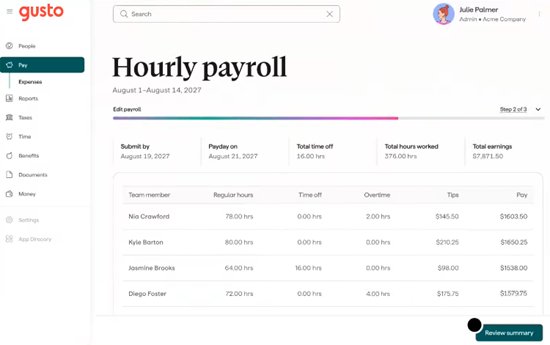
However, the additional features come at a cost. Its Simple plan only supports payroll in one state, and businesses needing multistate payroll or built-in time tracking must upgrade.
Pricing
Gusto has three main payroll plans: Simple, Plus, and Premium.
- Simple: $49 per month plus $6 per person monthly; best for small teams with straightforward payroll needs in one state.
- Plus: $80 per month plus $12 per person monthly; a better fit for growing businesses with multistate payroll or employees whose hours and schedules need tracking.
- Premium: $180 per month plus $22 per person monthly; designed for employers needing dedicated support, advanced HR guidance, and more detailed workforce cost management.
- Contractor Only (Legacy plan, closed to new customers): $35 per month plus $6 per contractor; suitable for businesses that pay independent contractors but have no W-2 employees.
Key features
- Payroll on AutoPilot: Employers can set recurring payroll to run automatically for eligible employees with predictable earnings. This reduces routine payroll preparation, although changes to wages, hours, and deductions still need attention.
- Child support garnishment management: Gusto can automatically withhold and remit child support payments to the appropriate agencies in most states (South Carolina requires employers to submit payments themselves). This is useful for reducing another recurring administrative task, but employers must still review withholding requirements.
- Workforce cost reporting: Gusto’s higher plans provide more detailed information about employee costs and project-related expenses. Businesses that need to understand how labor affects profitability can use these reports when reviewing budgets and staffing decisions.
Gusto pros and cons
| Pros | Cons |
|---|---|
|
|
Learn more about Gusto
2. Justworks: Best for outsourced payroll and HR support
Our rating: 4.5 out of 5
In addition to offering payroll tools, Justworks offers HR software and access to employee benefits. It stands out by providing robust human support for small businesses, even those looking to expand with a global workforce. Its Professional Employer Organization (PEO) and Employer of Record (EOR) services give businesses access to certified professionals and even whole teams for outsourced hiring and payroll.
Why I chose Justworks
What makes Justworks different is the level of professional support available. Most payroll providers on this list focus on giving businesses tools to manage employee payments and HR tasks themselves. Justworks’ PEO services go further by helping employers handle certain administrative and employment-related responsibilities.
For example, a growing company without an HR department may need guidance on workplace policies, employee benefits, or compliance requirements across different states. Through Justworks’ PEO plans, employers can access HR consultants and round-the-clock support rather than relying solely on software instructions.
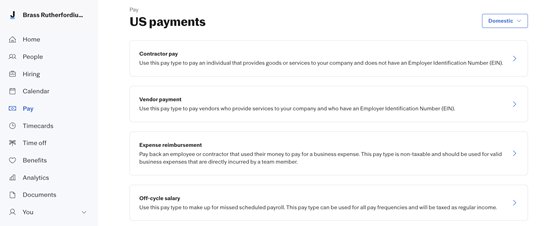
That support is also why Justworks costs more. Its PEO plans are not directly comparable to the basic payroll subscriptions offered by Patriot, Square, or OnPay. If you only need payroll processing and tax filing, its standalone Payroll plan will likely make more financial sense.
Pricing
Justworks offers three paid plans, including its Payroll, PEO Basic, and PEO Plus plans. Here is a brief overview of each:
- Payroll: $50 per month plus $8 per employee monthly; provides payroll processing, basic HR tools, and access to expert support without entering a PEO arrangement.
- PEO Basic: $79 per employee per month, with no base fee; adds HR consulting, compliance support, 24/7 assistance, and access to additional employee benefits.
- PEO Plus: $124 per employee per month, with no base fee; designed for employers seeking more comprehensive benefits administration, including medical, dental, vision, and eligible spending accounts.
Additional services are priced separately. For example, Justworks Time Tracking costs $8 per employee per month, while its international EOR solution starts at $599 per employee per month.
Key features
- Employee benefits administration: PEO Plus gives smaller employers access to a wider range of health and wellness benefits, including medical coverage and HSA/FSA options. This can be valuable for businesses competing for talent but lacking the resources to manage multiple benefits vendors.
- Compliance and HR resources: PEO customers can access workplace training, compliance assistance, and HR consulting. These services can help employers address unfamiliar HR situations, although they do not remove the employer’s legal responsibilities.
- Vendor and international contractor payments: Justworks supports vendor payments through its PEO services and offers international contractor payments as an add-on. Businesses working with different types of external workers can manage more payment activities without building separate processes.
Justworks pros and cons
| Pros | Cons |
|---|---|
|
|
Learn more about Justworks
3. Homebase Payroll: Best for very small hourly teams

Our rating: 4.2 out of 5
Homebase is primarily a workforce management tool. It allows you to onboard employees, schedule shifts, manage labor costs and tasks, communicate with their team, and track employee attendance. In addition to these HR tools, it comes with payroll software that can be added onto its workforce management plans.
Homebase Payroll is most affordable for very small teams that qualify for its free Basic plan. That plan is designed for one-location businesses with up to 10 employees. If your business fits that profile, adding payroll can create an affordable scheduling, time tracking, and payroll workflow in one system.
Why I chose Homebase Payroll
For hourly teams, payroll errors often start before anyone opens the payroll system. Employees might forget to clock out, work additional shifts, or receive different pay rates depending on their duties.
Homebase helps managers address these issues by keeping scheduling, timekeeping, and payroll connected. Rather than entering employee hours again, managers can review timesheets and use that information to calculate pay.
Square Payroll offers similar convenience for businesses already using Square’s POS system. Homebase is worth considering if you want a workforce management platform that isn’t tied to one particular POS provider.
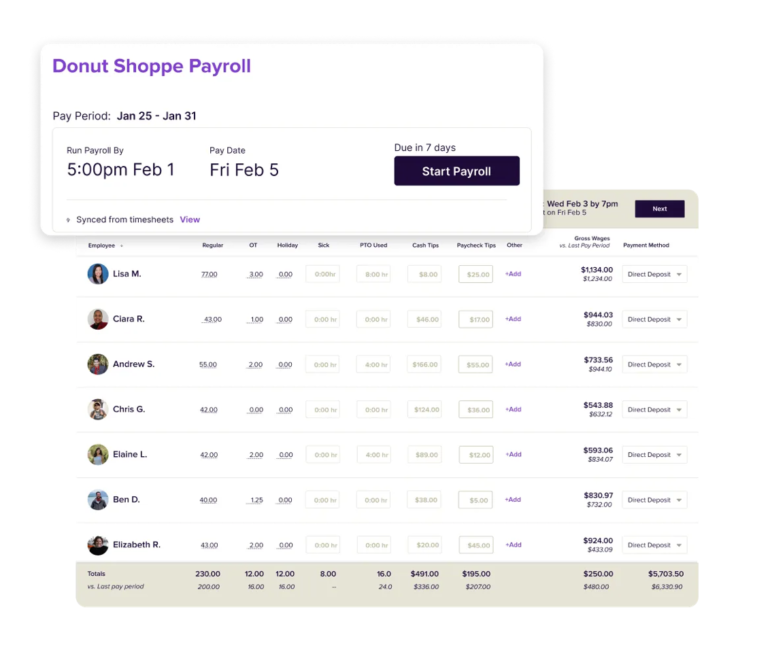
Its affordability depends on team size, though. The free Basic plan is limited to one location and 10 employees. Larger businesses may need to pay for workforce management software in addition to payroll.
Pricing
Homebase offers four workforce management plans, with payroll available as an add-on.
- Basic: As Homebase’s free plan, you get basic scheduling and time tracking tools, employee management tools, integrations, and help center and email support. You can also add payroll tools to this plan. However, this is limited to businesses with one location and up to 10 employees.
- Essentials: $30 per location monthly; adds more advanced scheduling, attendance management, and team communication capabilities.
- Plus: $70 per location monthly; suitable for businesses needing greater control over time-off requests, staff permissions, and scheduling.
- All-in-one: $120 per location. Provides broader HR, onboarding, labor management, and compliance tools.
- Payroll add-on: This add-on plan costs $49 per month, plus $6 per employee per month. It allows you to calculate employees’ wages, make direct deposit payroll payments, and automatically file your payroll taxes.
Key features
- Blended overtime calculations: Homebase can calculate overtime for employees who work at different hourly rates. For example, someone earning one rate as a cashier and another as a shift supervisor may require a weighted overtime calculation. This helps managers avoid working through those calculations manually.
- Employee self-onboarding: New hires can complete payroll forms and provide direct deposit information through Homebase. This reduces the paperwork managers need to collect before an employee’s first payday.
- Tip management: Homebase supports tip reporting and payroll calculations. Its separate Tip Manager add-on can pull tips from a connected POS system, calculate tip pools, and add the amounts to employee timesheets. Businesses with complex tip-sharing arrangements should account for the additional subscription cost.
Homebase Payroll pros and cons
| Pros | Cons |
|---|---|
|
|
Learn more about Homebase Payroll
4. Patriot Payroll: Best for DIY payroll tax filing

Our rating: 4.1 out of 5
Patriot offers a straightforward payroll processing software that starts at a very affordable $17 per month, plus $4 per user per month. This comes with core payroll tools to process employees and contractor payments, calculate federal and state taxes, and generate year-end payroll tax filings. Plus, you can add on Patriot’s time and attendance and HR software tools to enhance the platform’s features.
While its basic plan can keep costs low, you have to handle payroll tax filings yourself. This makes it ideal for cost-conscious small business owners who prefer this setup and only have a small team. However, a Full Service plan is also available that includes payroll tax filing services.
Why I chose Patriot Payroll
I chose Patriot Payroll because it gives small businesses control over how much payroll support they want to pay for. If you are comfortable filing payroll taxes yourself, the Basic Payroll plan keeps costs low while still giving you tools to calculate payroll, pay workers, generate reports, and manage employee access.
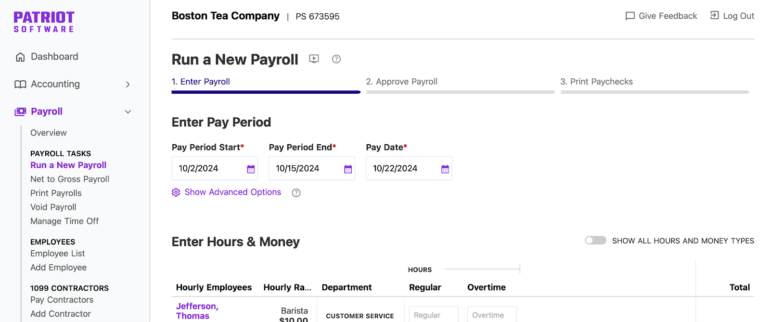
That said, DIY payroll tax filing is not for every business. If you operate in multiple states, have complicated pay rules, or do not want to track payroll tax deadlines yourself, the Full Service Payroll plan is the safer option.
Pricing
Patriot Payroll offers two plans:
- Basic Payroll: Starts at $17 per month, plus $4 per contractor or employee monthly; best for businesses prepared to calculate payroll using the software but handle their own tax filings.
- Full Service Payroll: Patriot’s Full Services payroll plan is $37 per month, plus $5 per contractor per month; includes federal, state, and supported local payroll tax filings and deposits, making it more suitable for employers who want less tax administration.
Full Service includes tax filing in one state. Each additional state costs $12 per month. Optional HR Software and Time & Attendance add-ons each start at $6 per month plus $2 per employee.
Key features
- Net-to-gross payroll calculations: Patriot has a tool that calculates the gross amount needed to provide a specific take-home payment. For example, if an employer wants to give someone a $500 net bonus, the system can calculate the gross amount required after taxes. This is useful for special payments, although some deductions and employee arrangements aren’t supported.
- Auto Payroll: Both plans can automatically process recurring payments for eligible W-2 employees with consistent pay. However, the feature doesn’t work with contractor payments or employees using Patriot’s integrated timecards, making it better suited to predictable payroll schedules.
- Detailed payroll reports: Employers can review payroll registers, payment details, and year-to-date information, including W-2 previews. These reports are useful for checking payroll records before year-end filings and identifying discrepancies.
Patriot Payroll pros and cons
| Pros | Cons |
|---|---|
|
|
Learn more about Patriot Payroll
5. OnPay: Best for multi-state payroll

Our rating: 4.1 out of 5
In addition to payroll software, OnPay offers HR and benefits administration tools. It stands out by providing robust payroll features for U.S.-based businesses, even offering unlimited pay runs in all 50 U.S. states in every plan.
Alongside payroll processing, the platform provides employee onboarding, reporting, and optional HR management capabilities. It also supports different pay rates and worker types, making it suitable for employers with more varied payroll requirements.
Why I chose OnPay
I chose OnPay because it offers affordable and transparent payroll for businesses with workers in more than one state. While some providers request additional fees or require you to upgrade to a higher tier for multi-state payroll, OnPay’s single plan is all-inclusive at just $49 per month, plus $6 per employee per month. Plus, its base plan includes most features that other cheap payroll service providers either don’t have or charge extra for, such as compliance audit tools and guidance from licensed experts.
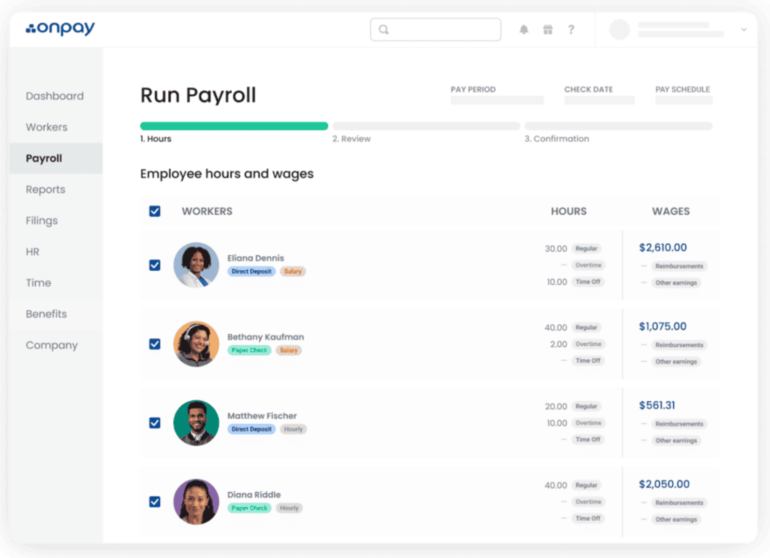
OnPay also includes setup and historical payroll data migration assistance, which can reduce the work involved in switching providers. However, businesses needing integrated time tracking or more advanced HR workflows will have to pay for additional services.
Pricing
OnPay offers its base Payroll Essentials plan for $49 per month, plus $6 per employee per month. This covers unlimited payroll runs, supported federal, state, and local tax filings, employee and contractor payments, year-end tax forms, and basic onboarding tools.
Businesses can extend the platform with:
- HR: $15 per month plus $2 per worker monthly, adding more employee management and document-related tools.
- Time Tracking: $15 per month plus $4 per worker monthly, allowing businesses to track and approve hours in the same system used for payroll.
- Compliance resources: $10 per month; includes employee handbook compliance guidance, state-specific labor law alerts, a job description builder, and additional compliance resources
- Live HR support: $65 per month; access to on-demand concierge HR guidance
Key features
- Custom payroll reporting: OnPay offers a report designer with more than 50 available data fields. Businesses can create reports based on the payroll information they need, whether that’s overtime expenses, deductions, or employee compensation by department.
- Digital employee onboarding: Employers can send offer letters for electronic signature and collect Forms W-4 and I-9 through built-in workflows. Its basic HR tools also help track outstanding paperwork before new employees begin work.
- Payroll flexibility: The platform supports multiple pay schedules and pay rates, off-cycle payments, and payroll corrections. This can help businesses manage bonuses, pay adjustments, or employees who receive different earnings within the same pay period.
OnPay pros and cons
| Pros | Cons |
|---|---|
|
|
Learn more about OnPay
6. QuickBooks Workforce: Best for QuickBooks accounting users
Our rating: 3.9 out of 5
QuickBooks Workforce brings payroll and employee management into Intuit’s broader business software ecosystem. For companies already using its accounting module, QuickBooks Online, this means payroll information can connect with accounting records, making it easier to monitor wages, taxes, and other labor-related expenses.
Its capabilities also extend beyond payroll. Depending on the subscription, businesses can access time tracking, hiring and onboarding tools, HR workflows, and performance management.
Why I chose QuickBooks Workforce
The strongest reason to choose QuickBooks Workforce is its connection to QuickBooks accounting software.
Many small businesses review payroll expenses separately from their other financial records. QuickBooks can make this easier by connecting payroll transactions with bookkeeping and, in supported plans, employee hours with project-related costs.
For example, a service business tracking hours across different customer projects may benefit from seeing how employee time affects project profitability. This is where QuickBooks’ broader accounting ecosystem can be more useful than a standalone payroll service.
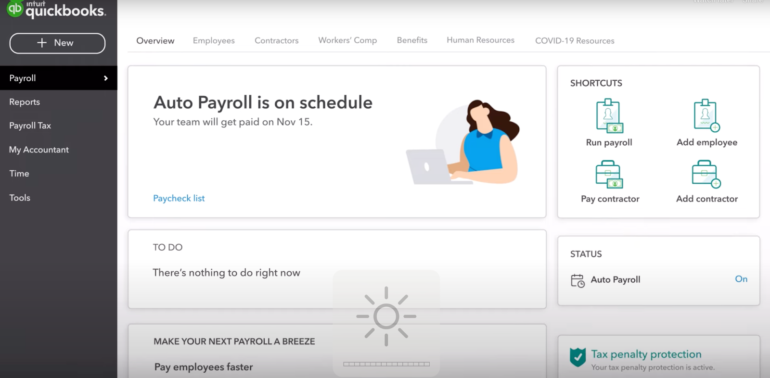
Still, this advantage matters most to businesses already invested in QuickBooks. If you don’t use its accounting tools, providers such as OnPay and Gusto may offer a more straightforward payroll solution.
Pricing
QuickBooks Workforce offers three payroll and HR plans:
- Workforce Payroll: $50 per month plus $7 per employee monthly; covers core payroll processing, tax services, employee records, and self-service tools.
- Workforce Premium: $88 per month plus $13 per employee monthly; adds time tracking and more advanced HR tools, making it better suited to businesses managing schedules, onboarding, and employee workflows.
- Workforce Elite: $134 per month plus $17 per employee monthly; includes more advanced time and project tracking, expert setup, and additional HR and payroll support.
Key features
- Automated HR workflows: Higher-tier subscriptions offer tools for managing employee onboarding, time-off requests, and other HR processes. These can reduce the need to send reminders or track routine approvals manually.
- Project-based time tracking: Workforce Elite supports more advanced time and project management capabilities, including geofencing and project reporting. Businesses can compare hours spent with planned work, helping them monitor labor costs.
- Performance management: Elite includes tools for documenting employee goals, feedback, and performance reviews. Employers who want to manage evaluations alongside employee records may find this convenient rather than maintaining a separate system.
QuickBooks Workforce pros and cons
| Pros | Cons |
|---|---|
|
|
Learn more about QuickBooks Workforce
7. Square Payroll: Best for small restaurant and retail businesses

Our rating: 3.7 out of 5
Square Payroll allows you to automate payroll for both employees and contractors. Because it also lets you connect your in-store point-of-sale (POS) system and sync your employee timecard data, it is a great option for restaurants or retail stores.
Why I chose Square Payroll
Square is worth considering if your business already uses its POS platform. It can bring together sales-related information, employee hours, and payroll data within the same ecosystem.
Its tip handling is a good example. Rather than asking managers to manually gather card tips and transfer them into payroll, Square can import supported tip information from its POS and team management tools.
Homebase has comparable timekeeping and payroll capabilities, but Square may be the more convenient option for merchants already using Square for sales. Businesses that aren’t using Square may find less value in choosing it over other payroll providers.
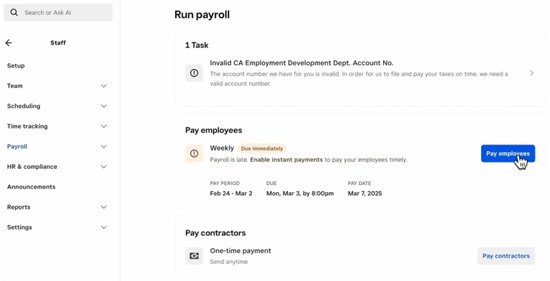
Another advantage is its seasonal billing option. Eligible businesses can avoid paying the full-service payroll subscription during qualifying inactive periods, which can help reduce costs when employees are only paid during certain months.
Pricing
Square Payroll starts at $35 per month, plus $6 per employee monthly Seasonal companies that aren’t paying employees regularly also don’t have to pay the monthly price. Its payroll plan offers all key features, including:
- Unlimited pay runs per month
- Check, direct deposit, or Cash App payments
- Auto payroll
- Off-cycle payments
- Multistate payroll
- Multiple pay rates
- A Square team app
- Employee self-onboarding
- Time tracking tools
- Scheduling tools
- Automated management tools
- Compliance alerts
If you only pay contractors, Square Payroll has a contractor-only payroll plan that costs $6 per worker, per month. It also includes unlimited pay runs, automated salary and tax calculations, simple onboarding tools, and multiple payment options.
Key features
- Tip tracking and importing: Square Payroll can import eligible credit card tips, including tips distributed through supported pooling arrangements. It also supports declared cash tips through Square Shifts. This helps managers include the correct amounts in payroll, although certain tip types and contractor payments aren’t supported for automatic importing.
- Flexible payment methods: Workers can receive payments through direct deposit, printed checks, or supported Cash App arrangements. This gives businesses more flexibility when accommodating employee payment preferences.
- Labor cost reporting: Square provides reports that combine employee wages and tips. Restaurant and retail managers can use this information to review staffing expenses alongside their sales activity.
Square Payroll pros and cons
| Pros | Cons |
|---|---|
|
|
Learn more about Square Payroll
More payroll coverage
How to choose the best cheap payroll service for your business
Choosing affordable payroll software involves more than comparing monthly subscription fees. You’ll also want to consider the types of employees you pay, how complicated your payroll is, and which tasks you’re comfortable handling yourself.
Here are five things to look at before making a decision:
- Calculate what you’ll actually pay. Start with the monthly base fee and per-worker charges, then account for any additional costs. Check whether the provider bills you for all employees or only those paid during the month. You should also factor in potential expenses for additional-state tax filings, time tracking, and HR tools.
- Consider how much payroll work you want to handle. Some inexpensive plans calculate payroll taxes but leave the actual filings and payments to you. Full-service options generally cost more but can save time and reduce administrative work. Think about whether the subscription savings are worth taking on those responsibilities.
- Check how the software handles your payroll requirements. If your employees work overtime, receive tips, or earn different hourly rates, make sure the system supports those calculations. Businesses with multiple pay schedules should also check whether they can run off-cycle payments and make payroll corrections without additional charges.
- Look at integrations with your existing tools. Payroll software that connects with your accounting, time tracking, or POS system can reduce manual data entry. For example, importing approved employee hours directly into payroll is generally easier than transferring timesheet information between applications.
- Find out what happens when something goes wrong. Payroll errors and last-minute pay changes can happen even with reliable software. Check what support is available, whether you can correct a submitted payroll, and how the provider handles missed deadlines or tax filing mistakes.
Before committing to a subscription, request a demo or use a free trial, if available. Try working through a typical pay run and a more complicated scenario, such as an overtime adjustment or off-cycle payment. This can give you a better idea of whether the software fits your business’s payroll process.
Cheap payroll software FAQs
Are there free payroll services for small businesses?
Free payroll tools are available, but they typically require more manual work than paid services. Some help calculate employee wages and deductions without handling payroll tax payments or filings. Others limit the number of employees or available features. Businesses considering free payroll software should check which tasks they’ll still need to manage and whether the subscription savings justify the additional administrative work.
How much does cheap payroll software cost for 10 employees?
The monthly cost depends on the provider’s base fee, per-employee charges, and included services. For example, a hypothetical subscription costing $40 per month plus $6 per employee would total $100 monthly for 10 employees. That amount could increase if the business needs additional-state tax filings, time tracking, or HR tools. Employers should also check whether charges apply to all enrolled employees or only those paid during the month.
Is contractor-only payroll cheaper than regular payroll software?
Contractor-only payroll plans generally cost less because they don’t include the same wage withholding and employer payroll tax services required for W-2 employees. Some providers also waive the monthly base fee and charge only for contractors paid. However, these plans typically don’t support employee payroll. Businesses paying both employees and contractors may find a combined payroll subscription more economical than maintaining separate services.
Do businesses have to pay for payroll software during months with no payroll?
It depends on the provider’s billing policy. Some payroll services continue charging their monthly base fee even when no employees are paid, while others offer seasonal inactivity or subscription-pause options. Businesses with seasonal workers or irregular payroll schedules should check whether they can suspend charges, how long the pause can last, and whether tax filings or year-end services remain available during inactive periods.