
According to Baymard Institute’s analysis of 50 studies, the average online shopping cart abandonment rate is about 70.22%, meaning roughly seven out of every 10 shoppers who add items to a cart never complete the purchase. In most cases, lost conversions are not driven by a lack of intent but by friction during checkout.
Checkout optimization focuses on removing that friction between purchase intent and payment confirmation. Across both small ecommerce stores and global marketplaces, four principles consistently drive measurable improvements: speed, pricing transparency, payment choice, and continuous testing.
In this guide, I discuss practical improvements, architectural considerations, and implementation approaches to help product, engineering, and business leaders increase conversion while maintaining reliability and compliance and increasing customer trust.
What is checkout optimization?
Checkout optimization is the process of improving the design, performance, reliability, and measurement of the ecommerce checkout flow to increase completed purchases. It focuses on reducing friction at each step between cart and order confirmation, while ensuring transactions remain secure, compliant, and resilient under load.
From a technical perspective, checkout optimization spans multiple layers of the stack:
- User interface layer: Form design, field validation, accessibility compliance, and mobile usability.
- Systems layer: Payment processing, fraud controls, decline handling, and third-party integration reliability.
- Operational layer: Event instrumentation, A/B testing, monitoring, and continuous iteration rather than one-time redesigns.
Why checkout optimization matters
Checkout is where ecommerce revenue is either captured or lost. While some abandonment is unavoidable, Baymard Institute’s research shows that a significant share of drop-offs stems from solvable checkout issues rather than a lack of purchase intent. Baymard finds that 65% of ecommerce sites deliver a mediocre or poor checkout experience, while only 2% meet a high usability standard, leaving clear room for improvement.
An optimized checkout experience affects multiple business metrics. For example:
- Pricing transparency drives conversion: Thirty-nine percent of shoppers abandon checkout when extra costs such as shipping, taxes, or fees appear late in the process, making early cost disclosure a direct lever for reducing abandonment.
- Uncomplicated checkouts complete purchases quickly: A complicated checkout process hurts completion. Eighteen percent of shoppers leave because the checkout flow feels too long or complicated, reinforcing the importance of streamlined forms and clear progression.
- Usability improvements deliver outsized returns: The average ecommerce site has roughly 32 checkout-specific improvements available, and Baymard’s usability testing indicates that large ecommerce sites can achieve around a 35% increase in checkout conversion by addressing common UX issues.
Beyond conversion, checkout optimization impacts revenue, retention, and risk. Higher completion rates increase revenue per session, while clear pricing and predictable delivery reduce churn and chargebacks. Improved payment decline handling lowers involuntary churn, and effective fraud controls protect both immediate revenue and long-term customer lifetime value.
Common checkout failure modes repeat across industries:
- Unexpected costs revealed late in checkout
- Performance issues, especially on mobile networks
- Payment failures caused by declines or weak retry logic
- Unnecessary friction from long forms or forced account creation
Together, these factors show why checkout optimization is not just a UX concern, but a revenue, risk, and retention opportunity.
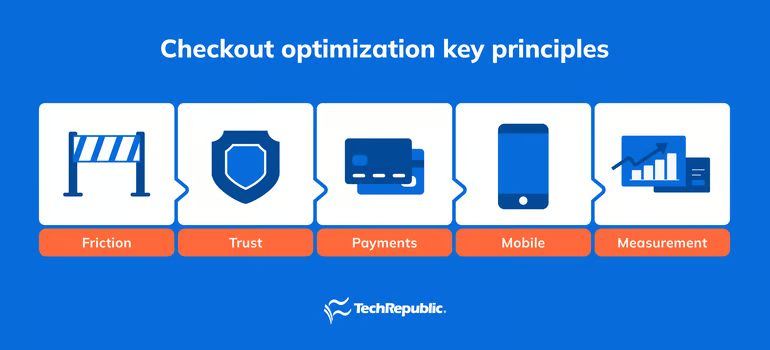
Checkout optimization key principles
Effective checkout systems share a small set of principles that guide design and implementation decisions. Together, these principles focus on minimizing user friction, building trust, and streamlining the purchasing journey to reduce cart abandonment and improve checkout completion.
Minimal friction
Every additional step, field, or decision increases cognitive load and the likelihood of abandonment. The goal is to collect only what is required to complete the transaction. Reducing unnecessary steps shortens time to purchase and directly improves checkout completion rates.
Best practices:
- Remove optional fields from the default checkout flow
- Avoid forced account creation by supporting guest checkout
- Use smart defaults for country, shipping method, and billing address
Clear and transparent information (pricing and delivery timeframes)
Customers should know exactly what they will pay before entering payment details. Late-stage cost surprises undermine trust and drive abandonment. Clear pricing upfront reduces hesitation and prevents drop-off at the payment step.
Best practices:
- Show shipping, tax, and fees directly in the cart
- Update totals dynamically as selections change
- Avoid introducing new charges at payment confirmation
Trust and reassurance
Checkout is where customers assess risk, particularly when sharing payment and personal information. Familiar signals and predictable behavior reduce perceived risk and increase payment confidence.
Best practices:
- Use recognizable payment brands and digital wallets
- Clearly surface security indicators and return policies
- Avoid unnecessary redirects or context switches during payment
Mobile-first execution
Most checkout sessions occur on mobile devices, often on slower networks and smaller screens. Poor mobile usability leads to faster abandonment and lower conversion rates.
Best practices:
- Use large, touch-friendly tap targets
- Trigger numeric keyboards for numeric inputs
- Minimize scrolling and page reloads
Resilient payments
Payments must succeed even when providers, networks, or issuers introduce friction or failures. Each failed payment represents lost revenue from customers who were ready to buy.
Best practices:
- Support multiple payment methods, including digital wallets
- Handle declines with clear messaging and recovery options
- Log, categorize, and monitor payment errors
Measurement-first mindset
Optimization requires visibility into user behavior and system performance. Measurement enables teams to prioritize improvements and validate results with data rather than assumptions.
Best practices:
- Track abandonment at each checkout step
- Measure authorization and payment success rates
- Monitor performance and errors in real time
Quick checkout optimizations that deliver immediate impact
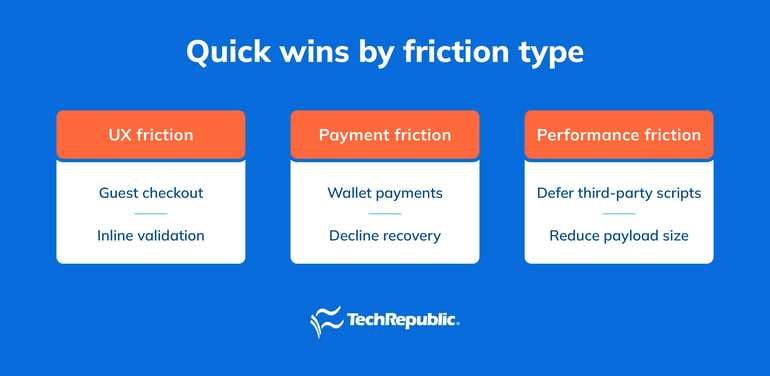
Not every checkout improvement requires a redesign or major engineering effort. Some of the highest-impact gains come from small, targeted changes that reduce friction, improve clarity, or speed up the checkout flow. These optimizations are especially effective because they address well-documented abandonment triggers and can often be implemented with configuration changes, lightweight frontend work, or provider-level features.
Enable guest checkout
- What to change: Allow customers to complete purchases without creating an account.
- Why it helps: Forced account creation is a common abandonment trigger, particularly for first-time buyers who are not yet ready to commit to a relationship with the brand.
- Implementation: Most ecommerce platforms and identity providers support guest checkout through a configuration setting or a simplified authentication flow. Account creation can still be offered after purchase.
- Real-world example: Large retailers such as Amazon and Target emphasize guest or “continue as guest” flows for first-time buyers, deferring account creation until after order confirmation.
- Test idea: Compare checkout completion rates between sessions with mandatory account creation and sessions where guest checkout is enabled.
Add wallet payments
- What to change: Support digital wallets such as Apple Pay and Google Pay.
- Why it helps: Wallets reduce form entry, speed up checkout, and perform especially well on mobile devices where typing is slower and more error-prone.
- Implementation: Enable wallet payments through your payment service provider and ensure wallet buttons are surfaced early in checkout, not buried behind card forms.
- Real-world example: Many mobile-first direct-to-consumer brands place Apple Pay and Google Pay buttons directly in the cart to shorten the path to payment.
- Test idea: Measure mobile conversion rate and time to checkout completion by device type before and after enabling wallets.
Show shipping and tax early
- What to change: Display estimated shipping costs and taxes in the cart, before customers reach the payment step.
- Why it helps: Late-stage cost surprises are among the most common reasons shoppers abandon their carts.
- Implementation: Use address hints, saved locations, or IP-based estimates to provide early cost visibility, even if the final total updates later.
- Real-world example: Leading ecommerce sites surface shipping estimates directly beneath cart totals, reducing uncertainty before checkout begins.
- Test idea: Track abandonment rates between cart and payment steps before and after adding early cost estimates.
Add inline validation
- What to change: Validate form fields as users type instead of waiting until submission.
- Why it helps: Inline validation prevents frustrating error loops and reduces failed submissions.
- Implementation: Use client-side validation with clear, field-specific error messages and visual cues.
- Real-world example: Modern checkout forms highlight errors immediately, such as invalid postal codes or incomplete card numbers, rather than after form submission.
- Test idea: Measure error frequency per field and overall submission failure rates.
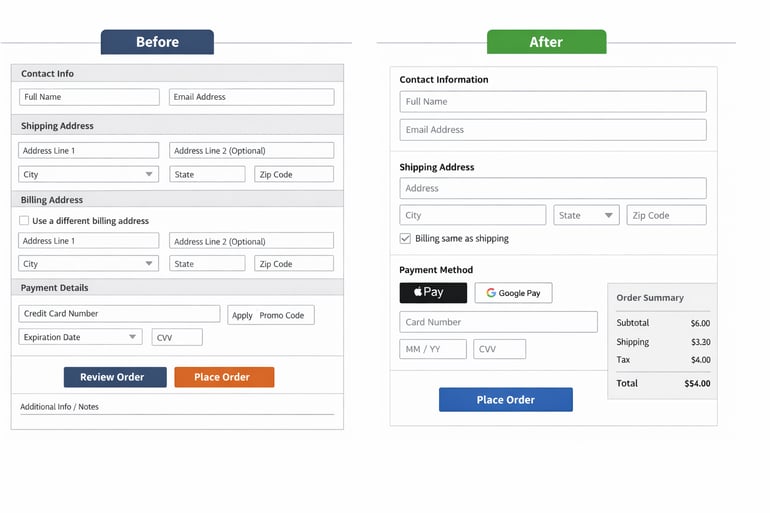
Reduce form fields
- What to change: Remove nonessential fields from checkout forms.
- Why it helps: Shorter forms reduce cognitive load and speed completion, especially on mobile.
- Implementation: Audit each field to confirm whether it is strictly required to process the order or comply with regulations.
- Real-world example: Many high-conversion checkouts eliminate secondary address fields and marketing opt-ins from the default flow.
- Test idea: Run an A/B test comparing a reduced-field checkout against the full form.
Enable address autofill
- What to change: Support browser-based or API-driven address autocomplete.
- Why it helps: Autofill reduces typing, errors, and time to complete checkout.
- Implementation: Integrate address autocomplete services or rely on native browser autofill where supported.
- Real-world example: Most enterprise ecommerce platforms now include address autocomplete as a standard checkout feature.
- Test idea: Measure average time to complete checkout and address-related error rates.
Remove blocking scripts from checkout
- What to change: Defer or remove nonessential third-party scripts from checkout pages.
- Why it helps: Blocking scripts slow down checkout load times and increase abandonment, especially on mobile networks.
- Implementation: Load analytics, personalization, and marketing tags after order confirmation or asynchronously where possible.
- Real-world example: High-volume merchants often run a stripped-down version of checkout with only payment, fraud, and monitoring scripts enabled.
- Test idea: Compare checkout load time, error rates, and conversion before and after script deferral.
What’s hot at TechRepublic
UX and form patterns
Checkout UX and form design have a direct impact on completed purchases. Even when pricing, payments, and performance are optimized, poorly structured forms or unclear progression can introduce friction that causes shoppers to abandon late in the funnel. UX patterns determine effortless checkouts, how quickly users recover from errors, and whether the flow adapts well to different devices and accessibility needs.
Effective checkout optimization treats form design as a system, not a static layout. Decisions such as single-page versus multi-step flows, field grouping, validation behavior, and keyboard navigation all influence a potential buyer’s cognitive load and task completion. Small design choices at the field level often compound into meaningful differences in checkout completion, especially on mobile devices or for first-time buyers.
I outline proven UX and form patterns that reduce friction, support accessibility requirements, and align checkout behavior below.
Single-page vs multi-step checkout
The choice between a single-page and multi-step checkout has a direct effect on completion rates. Neither approach is universally better. The right model depends on how much information must be collected, how complex validation is, and how much reassurance customers need during checkout.
- Single-page checkouts work best when the transaction is simple and requires minimal data entry. This approach is common for consumer ecommerce with low average order values and straightforward shipping and payment requirements.
- Multi-step checkouts are better suited for complex transactions. Breaking checkout into steps allows teams to validate data incrementally, surface context-specific guidance, and reduce cognitive overload when many fields are required. This is especially useful for regulated industries, international shipping, subscriptions, or B2B purchases.
In both cases, progress indicators and clear step labeling help users understand where they are and what remains.
Field-level design patterns
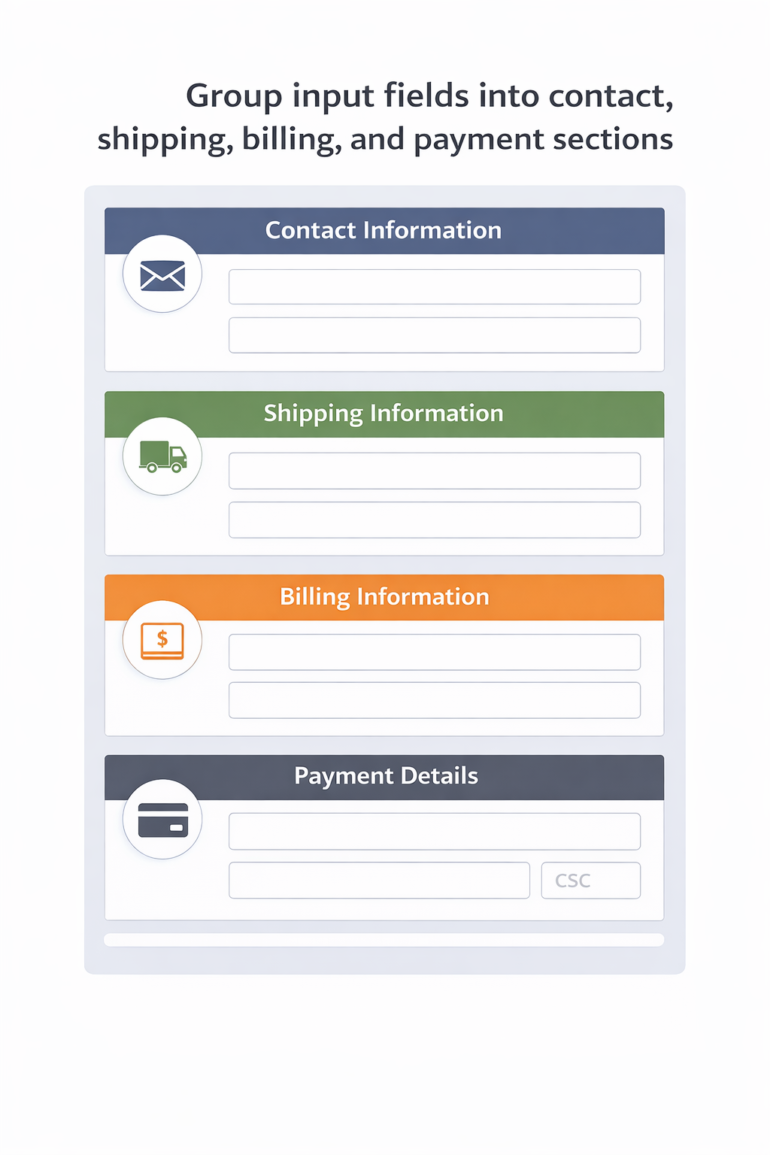
Field-level design determines how quickly users can move through checkout and how easily they recover from errors. Poor field structure often leads to repeated validation failures and abandonment late in the flow.
Related fields should be grouped logically, such as contact information, shipping address, and payment details. Optional inputs should be hidden under progressive disclosure to avoid distracting users who do not need them. Defaults should be applied wherever possible to reduce decision-making and typing.
Examples include preselecting the most common shipping method, defaulting the billing address to the shipping address, and auto-selecting the country and state based on location signals.
Best practices:
- Group related fields visually and semantically
- Hide optional fields until needed
- Apply smart defaults for country, state, and shipping method
- Avoid splitting tightly related fields across steps
Accessibility and keyboard flow
Accessible checkout design is both a usability and compliance requirement. Accessible design also improves usability for all users, particularly on mobile devices or in low-attention contexts.
- Checkout must be fully usable without a mouse and compatible with assistive technologies.
- All form fields should have explicit, visible labels rather than placeholder-only text.
- Keyboard focus should follow a logical order that matches visual layout.
- Error messages should be descriptive, announced to screen readers, and clearly associated with the relevant field.
Best practices:
- Ensure full keyboard navigation across checkout
- Use explicit labels and ARIA (Accessible Rich Internet Applications) attributes where appropriate
- Tie error messages directly to the affected fields
- Preserve user input when validation errors occur
Payments strategy
Payments are a critical dependency of checkout performance. Even well-designed checkout flows fail when payment authorization is slow, unreliable, or misaligned with customer expectations. An effective payments strategy balances conversion, reliability, fraud control, and operational overhead across regions and devices.
Payment method selection
Payment methods should reflect how customers expect to pay. While card payments remain foundational, digital wallets and local payment methods often improve authorization rates and reduce friction, particularly on mobile and in international markets. Payment method mix should be reviewed regularly as customer behavior and market coverage evolve.
- Cards are still required for broad coverage, subscriptions, and B2B transactions.
- Wallets reduce data entry and leverage device-level authentication.
- Local payment methods matter in regions where cards are less dominant or where bank-based transfers are preferred.
Choose your payment method offering based on these selection criteria:
- Customer location: Preferred methods vary widely by country and region
- Device usage: Wallets perform best on mobile, especially iOS and Android devices
- Average order value: Higher AOVs may benefit from BNPL or bank transfer options
Tokenization and saved payments
Tokenization replaces sensitive card data with secure tokens, reducing PCI scope while enabling faster repeat purchases. Saved payment methods are particularly effective for returning customers, subscriptions, and marketplaces.
However, convenience must be balanced with security and reliability. Expired cards, revoked tokens, and issuer changes can break saved payment flows if fallback paths are not in place.
Best practices:
- Tokenize payment credentials at the provider level
- Allow users to manage saved payment methods
- Automatically prompt for alternative payment methods when tokens fail
Related reading: What is PCI Compliance?
Decline handling and recovery
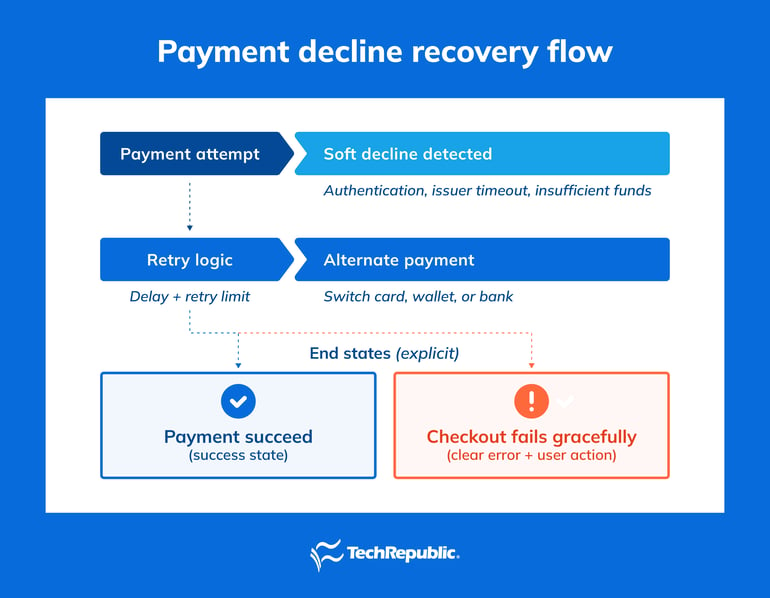
Not all payment declines are final. Many are “soft” declines caused by temporary issues such as authentication requirements, issuer timeouts, or insufficient funds at the moment of authorization.
Effective decline handling focuses on recovery rather than immediate failure. Clear, actionable error messages help customers retry successfully, while behind-the-scenes logic can attempt alternative routing or methods.
Best practices:
- Distinguish soft declines from hard declines
- Retry eligible transactions with updated parameters
- Offer alternative payment options when retries fail
One-click and frictionless repeat purchases
For logged-in users, one-click checkout significantly reduces time to purchase and increases repeat conversion. These flows work best when paired with strong fallback mechanisms.
If saved credentials fail, users should be seamlessly returned to a standard checkout flow without losing progress or cart contents.
Best practices:
- Limit one-click checkout to authenticated users
- Provide clear confirmation before payment
- Ensure graceful fallback to full checkout when needed
Shipping, tax, and pricing transparency
Pricing clarity is one of the strongest predictors of checkout completion. Customers should understand the total cost before reaching the payment step.
Shipping estimators belong in the cart, not hidden until checkout. Free shipping thresholds should be tested rather than assumed, as their effectiveness varies by margin and order size.
Tax presentation depends on the region. Outside the US, VAT and GST are often expected to be included in displayed prices. Returns and delivery expectations should be visible before payment to reduce hesitation and post-purchase disputes.
Best practices:
- Display shipping and tax estimates early
- Update totals dynamically as inputs change
- Clearly surface return policies and delivery timelines
Fraud, risk, and security
Fraud prevention introduces unavoidable tension between protection and conversion. Overly aggressive controls increase false declines, while weak controls increase chargebacks and operational costs.
Risk-based approaches allow low-risk transactions to pass with minimal friction while applying step-up authentication to higher-risk sessions. This requires continuous tuning as fraud patterns change.
False declines are especially costly, as they block legitimate customers who are ready to buy. Regular review of rules, thresholds, and issuer responses is critical. Data handling should follow PCI and privacy requirements, with clear ownership between product, payments, security, and legal teams.
Best practices:
- Use risk scoring rather than blanket rules
- Monitor false decline rates alongside fraud rates
- Align fraud controls with regional regulations and customer expectations
Performance, reliability, and architecture
Checkout typically depends on multiple external services, payload size, script execution, and network calls must be tightly controlled. Performance monitoring should combine real user monitoring (RUM) with synthetic testing. RUM captures how checkout behaves across real devices, browsers, and network conditions, while synthetic tests help teams detect outages or latency spikes before customers encounter them.
From an architectural standpoint, checkout must be treated as a high-availability system rather than a static page.
High-availability design considerations include:
- Multiple payment providers: Redundant PSPs reduce single points of failure and allow dynamic routing during outages or authorization issues.
- Graceful degradation: When noncritical services fail, checkout should continue with reduced functionality rather than blocking purchases entirely.
- Feature flags and rollback paths: Feature flags enable dark launches, controlled rollouts, and rapid rollback when issues arise.
As organizations scale, headless or composable checkout architectures become increasingly relevant. Decoupling checkout from the core ecommerce platform allows faster iteration, regional customization, and independent scaling, while also reducing blast radius when failures occur elsewhere in the system.
Read more: Composable Commerce vs Headless Ecommerce: How to Choose the Right Approach
Personalization can increase average order value, but it must be applied carefully within checkout. The goal is to enhance relevance without disrupting task completion.
Effective checkout personalization prioritizes subtle, low-friction interactions. Contextual recommendations, pre-applied loyalty benefits, and lightweight incentives tend to perform better than aggressive upsell tactics.
Key guidelines:
- Keep upsells relevant and limited in number
- Avoid intrusive modals or pop-ups that interrupt checkout flow
- Prevent coupon fields from dominating visual hierarchy or encouraging code hunting
Loyalty incentives can coexist with guest checkout when positioned thoughtfully. For example, highlighting points earned or benefits unlocked after payment preserves conversion while still promoting account creation.
Measurement and testing framework
Checkout optimization depends on continuous measurement and controlled experimentation. Without clear metrics and instrumentation, teams cannot reliably identify bottlenecks or validate improvements.
Core checkout metrics include:
- Checkout conversion rate: Percentage of checkout sessions that complete successfully
- Abandonment by step: Drop-off rates at each stage of checkout
- Payment decline rate: Authorization failures segmented by reason and method
- Average order value: Impact of promotions and upsells
- Revenue per session: Overall efficiency of checkout relative to traffic
Accurate measurement requires consistent event instrumentation across the checkout flow.
Instrumentation should capture:
- Cart viewed
- Checkout started
- Each checkout step completed
- Payment attempted
- Payment succeeded or failed
Testing should be prioritized using an impact versus effort matrix, focusing first on changes likely to influence conversion or reliability with minimal risk. Guardrail metrics are critical to avoid hidden regressions. Recommended guardrails include error and exception rates, checkout load time and time to interactive, and payment failure and retry rates
By combining disciplined measurement with incremental testing, teams can improve checkout performance while maintaining system stability.
Implementation roadmap and governance
Checkout optimization succeeds when improvements are delivered in a controlled, repeatable way rather than through one-off redesigns. A clear roadmap and governance model help teams prioritize changes, manage risk, and coordinate across functions that own different parts of the checkout experience.
Prioritization framework
Teams should prioritize initiatives using a simple scoring model that weighs business upside against implementation effort and operational risk. A common approach is to score each initiative across three dimensions:
- Impact: Expected effect on conversion, revenue, or reliability
- Effort: Engineering time, dependencies, and implementation cost
- Risk: Potential for regressions, compliance issues, or customer disruption
High-impact, low-effort, and low-risk changes should be scheduled first, especially when addressing known abandonment drivers.
Release and rollout practices
Because checkout directly affects revenue, release discipline is critical. Changes should be deployed gradually and be easy to reverse.
- Feature flags: Enable controlled rollouts, A/B testing, and instant disablement if issues arise
- Dark launches: Deploy code paths without exposing them to users to validate stability
- Rollback plans: Maintain the ability to revert changes quickly without redeploying
Checkout releases should avoid peak traffic periods and include monitoring plans before, during, and after rollout.
Cross-functional governance
Checkout touches multiple teams, each with different priorities and constraints. Clear ownership and communication prevent conflicts and delays.
Key stakeholders typically include:
- Product: Defines user experience and prioritization
- Engineering: Owns implementation, performance, and reliability
- Payments: Manages providers, routing, and authorization logic
- Operations and finance: Handle reconciliation, refunds, and reporting
- Legal and compliance: Ensure adherence to PCI, privacy, and regional regulations
Regular review cycles and shared metrics help align teams around conversion, reliability, and risk management goals.
Frequently asked questions (FAQ)
Should checkout allow guest purchases or require an account?
Guest checkout should be the default for first-time buyers. Account creation can be offered after purchase to avoid introducing friction early in checkout.
Is a single-page or multi-step checkout better?
Single-page checkouts work best for simple transactions with few required fields. Multi-step flows are better suited for complex, regulated, or international purchases.
How many fields should a checkout form include?
Only fields required to process payment, delivery, or compliance should appear in the default flow. Optional inputs should be deferred or hidden.
When should buy now, pay later (BNPL) options be offered in a checkout process?
BNPL tends to perform best for higher average order values and discretionary purchases. It should be validated through testing rather than assumed to improve conversion.
How should international taxes be displayed during checkout?
Tax display should follow regional norms. Outside the US, VAT or GST is often expected to be included in listed prices rather than added at checkout.
Conclusion and next steps
Checkout optimization delivers measurable returns when approached as an ongoing operational discipline rather than a one-time project. Improvements to speed, transparency, payment reliability, and usability compound over time and directly affect revenue, retention, and customer trust.
Based on company size, my recommended first steps are:
- Small teams: Enable guest checkout, add wallet payments, and surface shipping and tax early
- Mid-market teams: Instrument step-level analytics, reduce form friction, and improve decline handling
- Enterprise teams: Invest in payment redundancy, performance monitoring, and modular checkout architecture
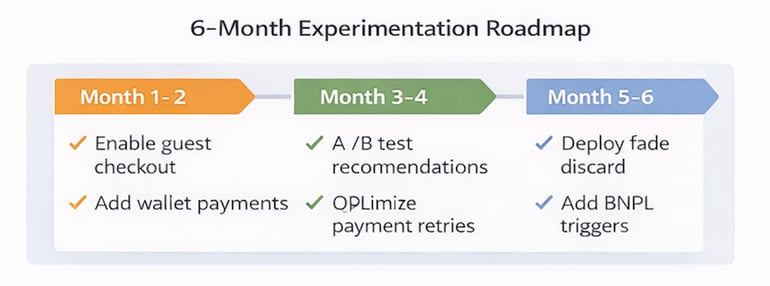
To sustain progress, teams (regardless of size) should build a six-month experimentation roadmap that includes a prioritized backlog of checkout improvements, clear success metrics and guardrails, and regular testing and review cycles tied to business outcomes.
By combining disciplined measurement, controlled releases, and cross-functional ownership, organizations can continuously improve checkout performance while maintaining reliability and compliance.